Ingrid Payables · Accounts payable for Spire

Every invoice, accounted for.

Vendor invoices captured, read, matched to the PO, approved and posted to Spire. Ingrid does the reading; your team checks and confirms every step.

The real Payables screen · sample data · nothing you do here is saved
Book a demo
ap.ingrid-app.com/invoices
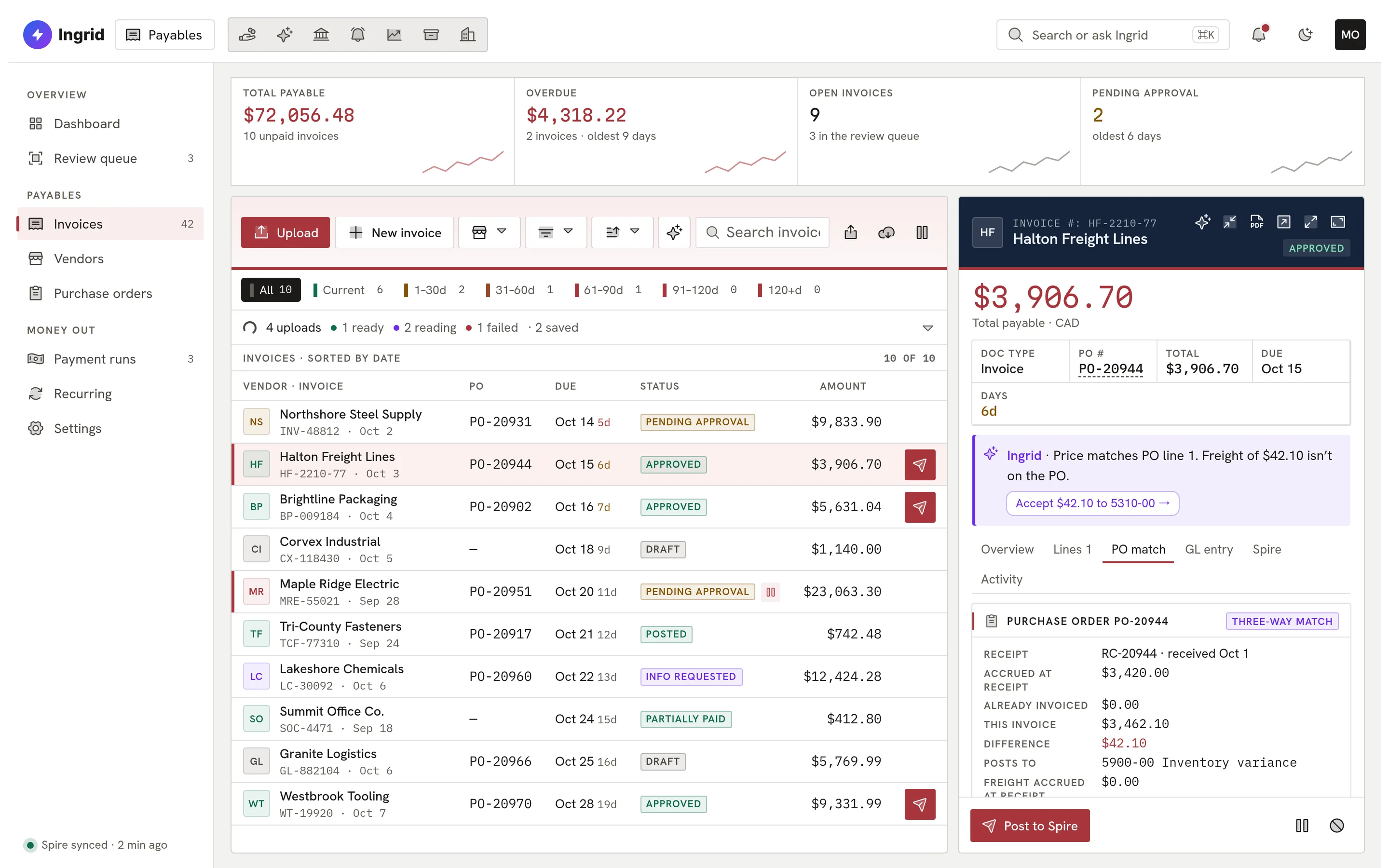
Ingrid Payables with an invoice open on its PO match tab, showing a three-way match against the receipt.

The real Payables screen, live in your browser with sample data.

Works with
SpirePosting through Spire’s own API, read back after every post.
Canadian tax
GST · HST · QST · PSTEach tax to its own account; PST into the expense lines.
Matching
Three-wayInvoice, PO and receipt, with a tolerance and an over-invoice check.
Control
ConfirmedIngrid suggests; a person approves and posts. Every step on the record.
How an invoice moves

Six steps. One of them is yours.

Capture, reading and matching are Ingrid’s job. Approval is yours. Posting is checked against what Spire actually holds.

  1. ArrivesEmail, upload or phone camera
  2. ReadEvery field scored for confidence
  3. MatchedTo the PO and the receipt
  4. ApprovedBy the right person, never the submitter
  5. PostedThrough Spire’s own API
  6. PaidIn a batch that checks every invoice first

Every step recorded: who, what and when

The flow, in the product

One invoice, six careful steps.

Follow a freight invoice from the moment it arrives to the moment Spire holds it.

  1. 01 Capture

    Drop it, email it or photograph it.

    Each company gets its own inbox address for vendor invoices. Mail from a sender you have not trusted is held for someone to allow, and is never read by Ingrid until you do.

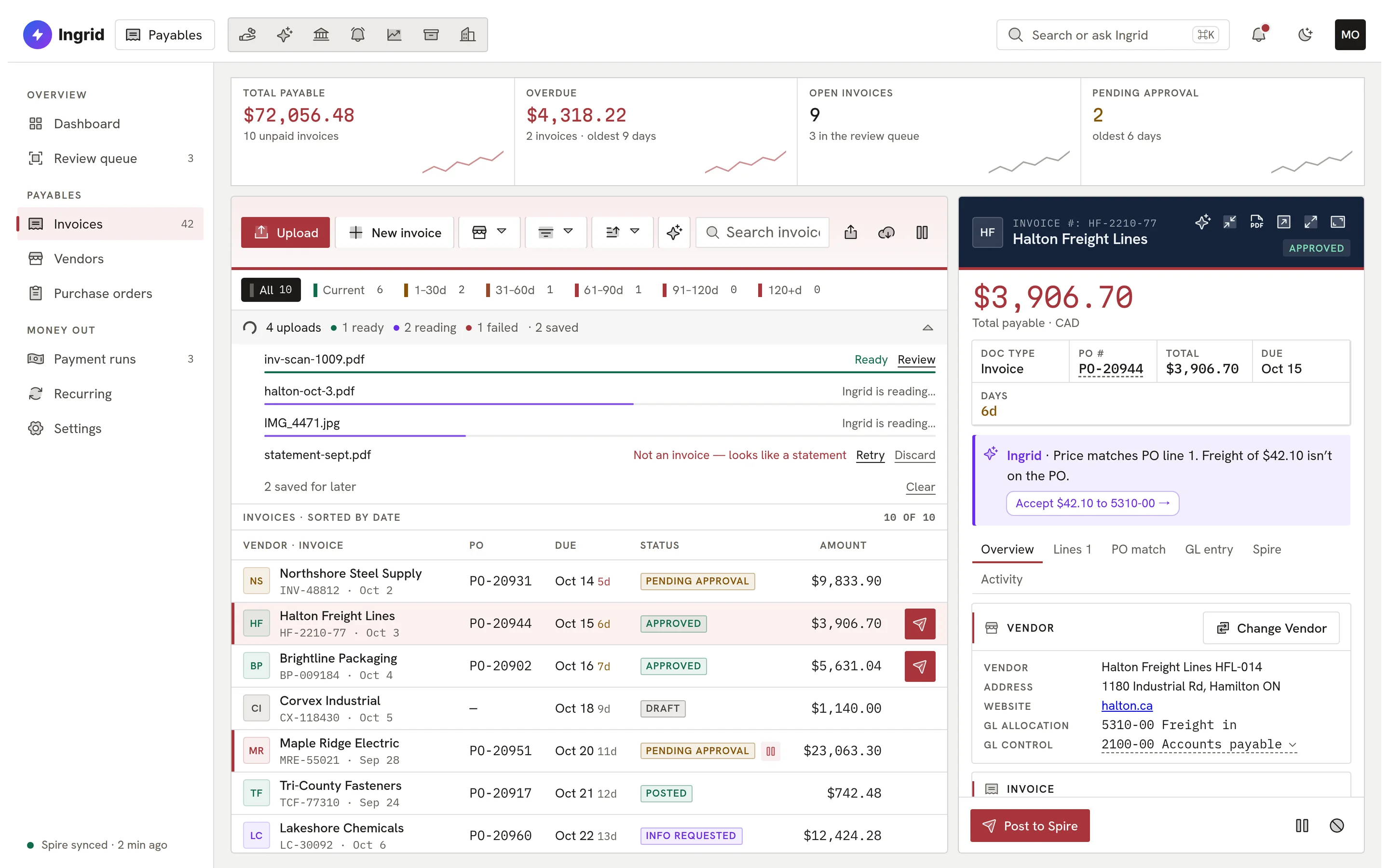
    Ingrid Payables invoice list with the upload queue open: one file ready, two being read, one rejected as a statement.
  2. 02 Read

    Ingrid reads every field, and says how sure it is.

    Extraction scores each field’s confidence and flags anything that is not an invoice, hidden text in a PDF, or a sender who does not usually invoice for that vendor. GL accounts are learned per vendor.

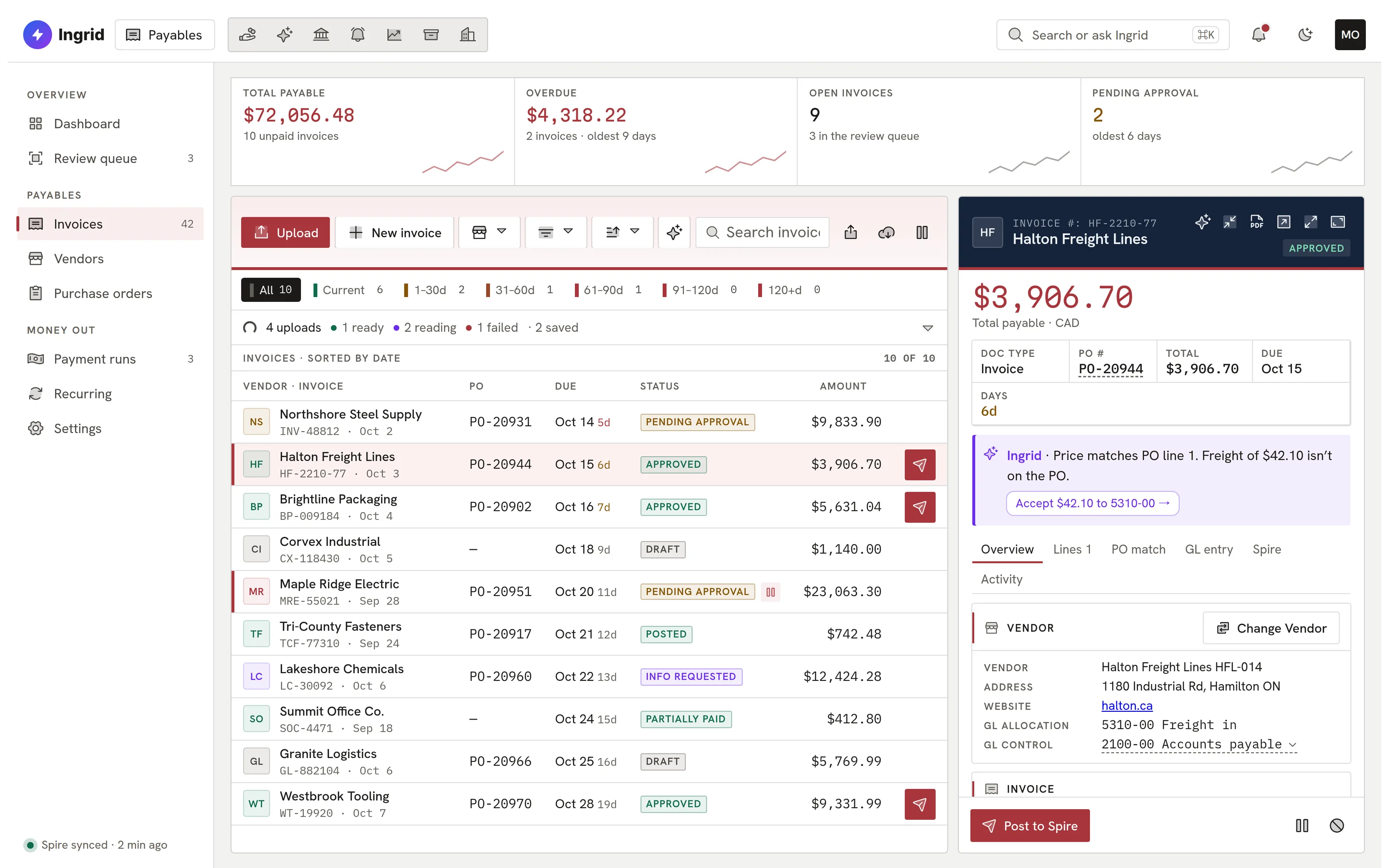
    An invoice record from Halton Freight Lines with an Ingrid note explaining that the price matches the purchase order but a freight charge does not.
  3. 03 Match

    Matched to the purchase order and the receipt.

    Line matching, three-way match, a variance tolerance and an over-invoice check. When a figure is off, you see exactly which line and by how much.

    The PO match tab showing a three-way match against the receipt with a $42.10 difference posting to an inventory variance account.
  4. 04 Approve

    Routed to the right person, every time.

    Approval chains by amount and vendor, delegations while someone is away, and a rule that nobody approves their own invoice.

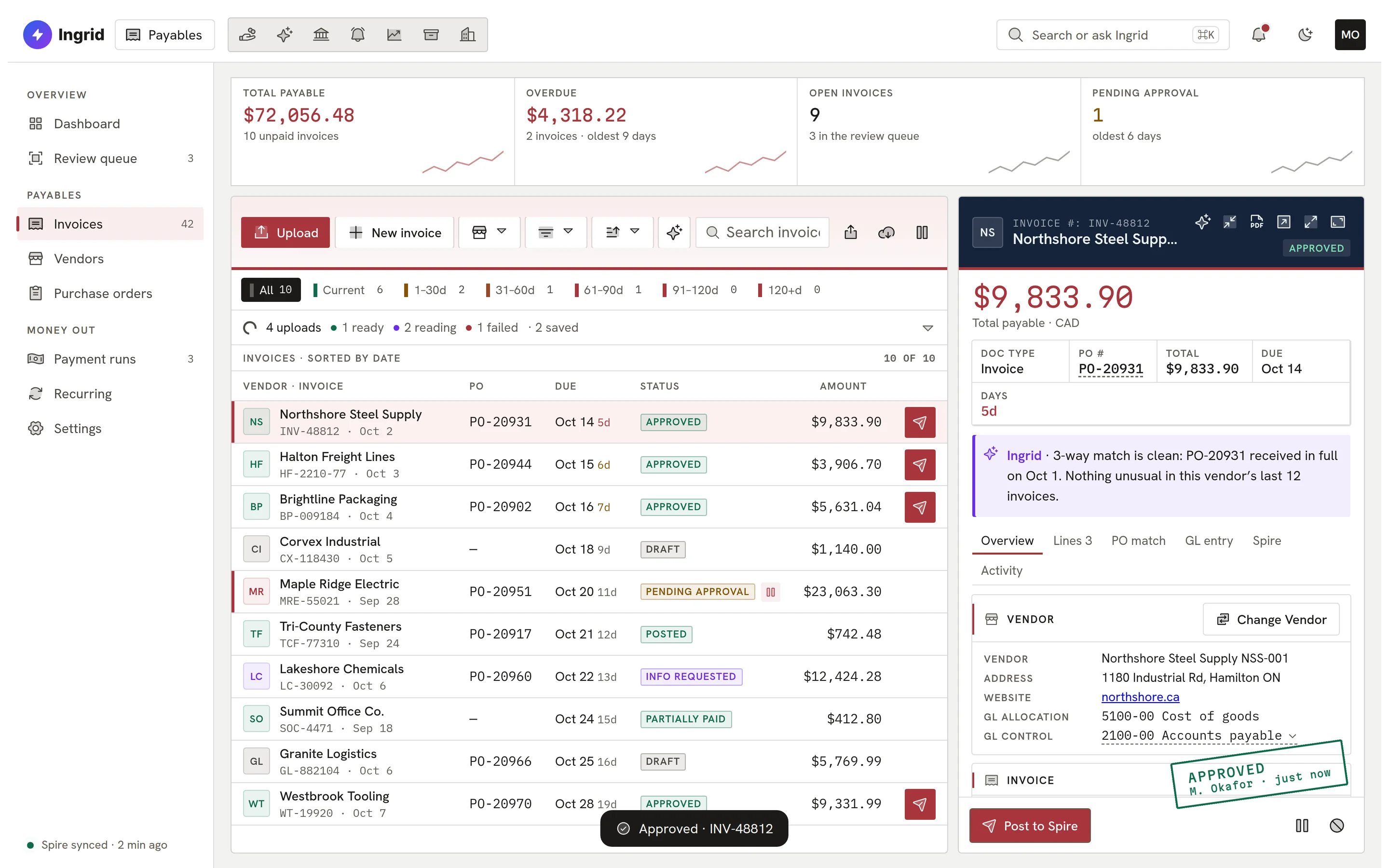
    Northshore Steel Supply invoice stamped Approved by M. Okafor.
  5. 05 Post

    Posted to Spire, then read back.

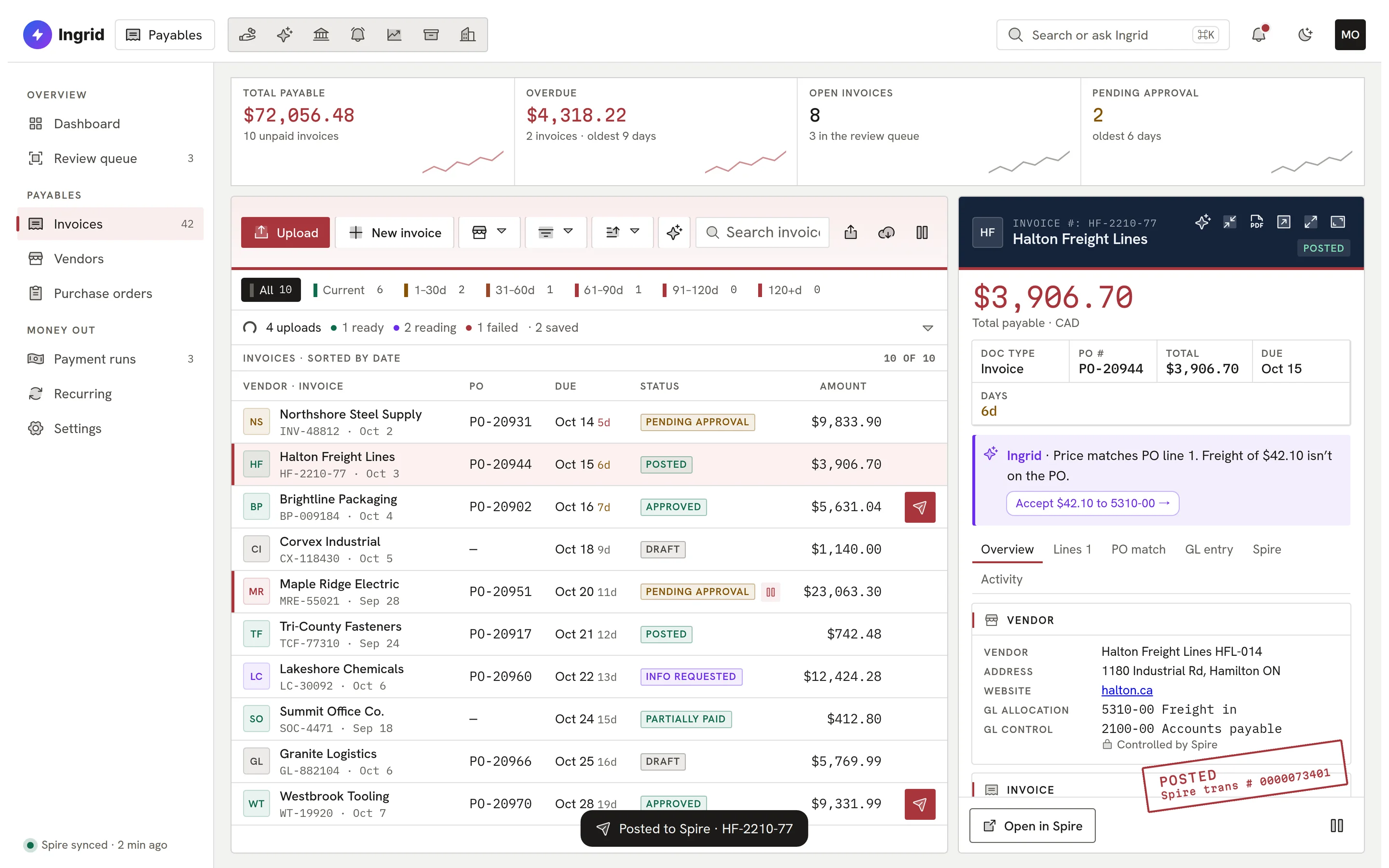
    Ingrid posts through Spire’s own API and reads the result back to confirm what Spire holds. The PDF is attached in Spire, and the Spire transaction number stays on the record.

    The Halton Freight Lines invoice stamped Posted with its Spire transaction number.
  6. 06 Ask

    Ask about any invoice, in plain English.

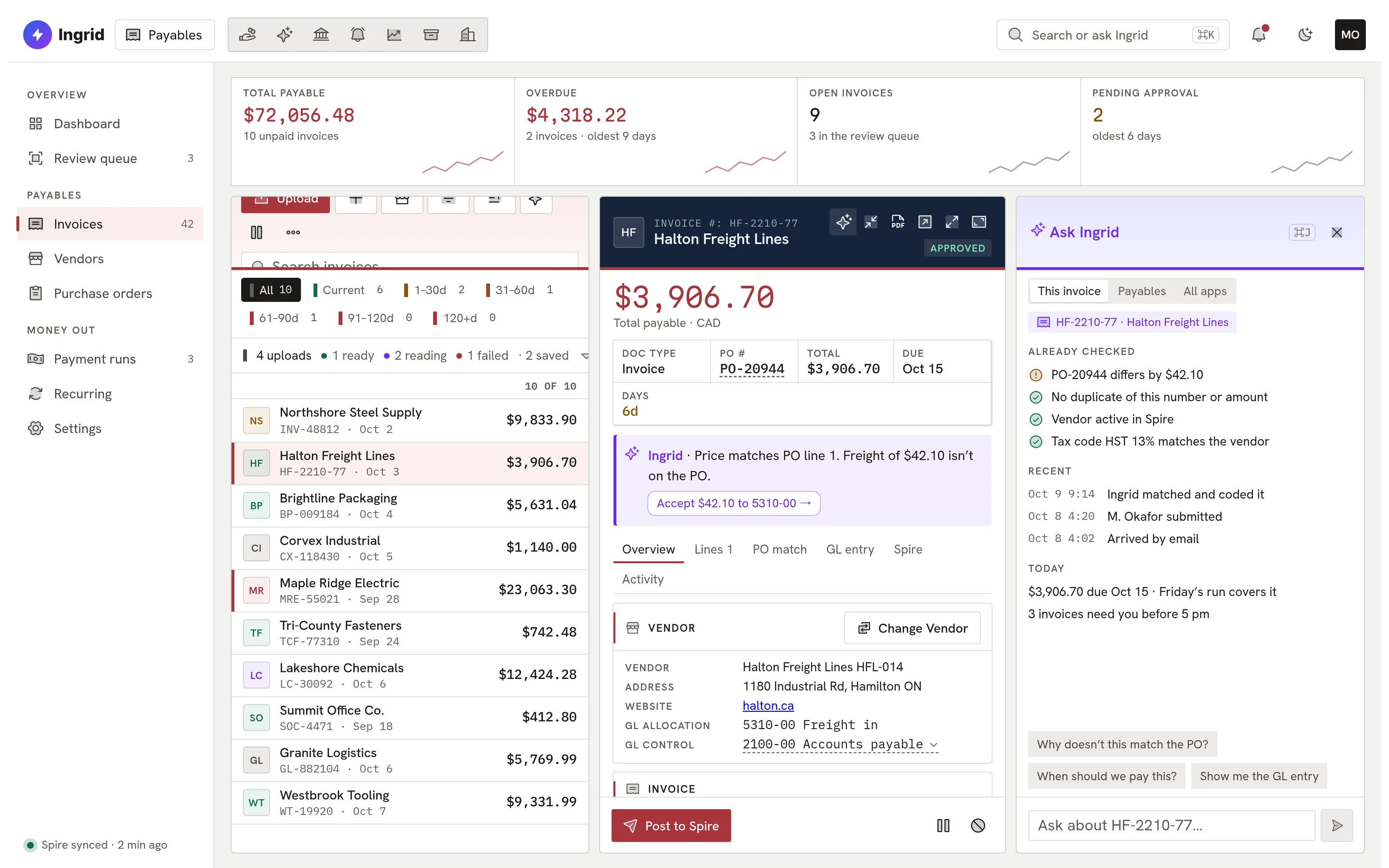
    Ask Ingrid sits beside the record. It can explain a mismatch or prepare the next step, and nothing is written until a person clicks Confirm.

    The Ask Ingrid panel beside an invoice, listing the checks already run and suggested questions.
ap.ingrid-app.com/invoices
Ingrid Payables invoice list with the upload queue open: one file ready, two being read, one rejected as a statement.
Playground

Try it. It’s the real thing.

Pick a step, or click around the screen yourself: open a record, switch tabs, approve, post. It runs on sample data in your browser.

ap.ingrid-app.com/invoices
Uploads being read by Ingrid

This is the real Payables screen running in your browser with sample data. Click anything; nothing is saved and nothing leaves the page.

Built for the controller

The controls a finance team actually asks for.

Built for the person who signs off on the books, not just the person who keys the invoice.

  • Your own AP address

    Mail from unknown senders is held for someone to allow, and never reaches Ingrid until trusted.

  • Confidence per field

    Extraction flags non-invoices, hidden PDF text and senders who don’t usually invoice for that vendor.

  • Duplicates refused

    Exact repeats are refused; the same number with a different total waits for a person.

  • Split coding

    Accounts learned per vendor; lines split by dollars or percent; the whole entry open to override.

  • Canadian tax

    GST, HST and QST to their own accounts. A tax that differs from Spire’s code needs a confirm.

  • Approval chains

    Multi-level by amount and vendor, with delegations and no approving your own invoice.

  • Posted and read back

    Posted through Spire’s API, read back, and the PDF attached in Spire.

  • Payment batches

    Every invoice checked first; the ones that can’t be paid are named and the rest still go.

In detail

Look closer. It holds up.

Real screens, cropped to the part that matters.

Review

What Ingrid read, beside the invoice.

The PDF on one side, the fields on the other, each with its confidence. Anything off the PO is called out before you continue.


A Halton Freight Lines invoice PDF beside the fields Ingrid read, with confidence scores and a note that a fuel surcharge is not on the PO.
Canadian tax

PST into the expense lines.

GST to its own account; non-recoverable PST spread into each line, balanced before it posts.

A GL entry with PST portions added to each expense line and GST to its own account.
Payments

Checked before it’s paid.

An invoice Spire says not to pay is named, and the rest of the batch can still go.

A payment batch pre-check naming one invoice that cannot be paid because the vendor is on hold in Spire.
Audit

Every change, old value and new.

A plain-English audit log: who changed what, from what, to what, and when.

The Payables audit log with plain-English entries showing old and new values.
Approvals

Chains you can read.

Levels by amount and vendor, any-one or all-must-approve, with delegations while someone is away.

Approval chain settings with a three-level chain for capital equipment.
Spire

The Spire record, kept on the invoice.

After posting, the Spire tab shows the transaction number and Spire ID, read back from Spire itself.

The Spire tab of a posted invoice with its transaction number and Spire ID.
On a phone · in pilot

Snap the invoice. Done.

The phone layout is in pilot with selected companies. Take a photo of an invoice, check the fields Ingrid read and create the draft in one tap. Coding splits and line detail stay on the desktop, where they belong.
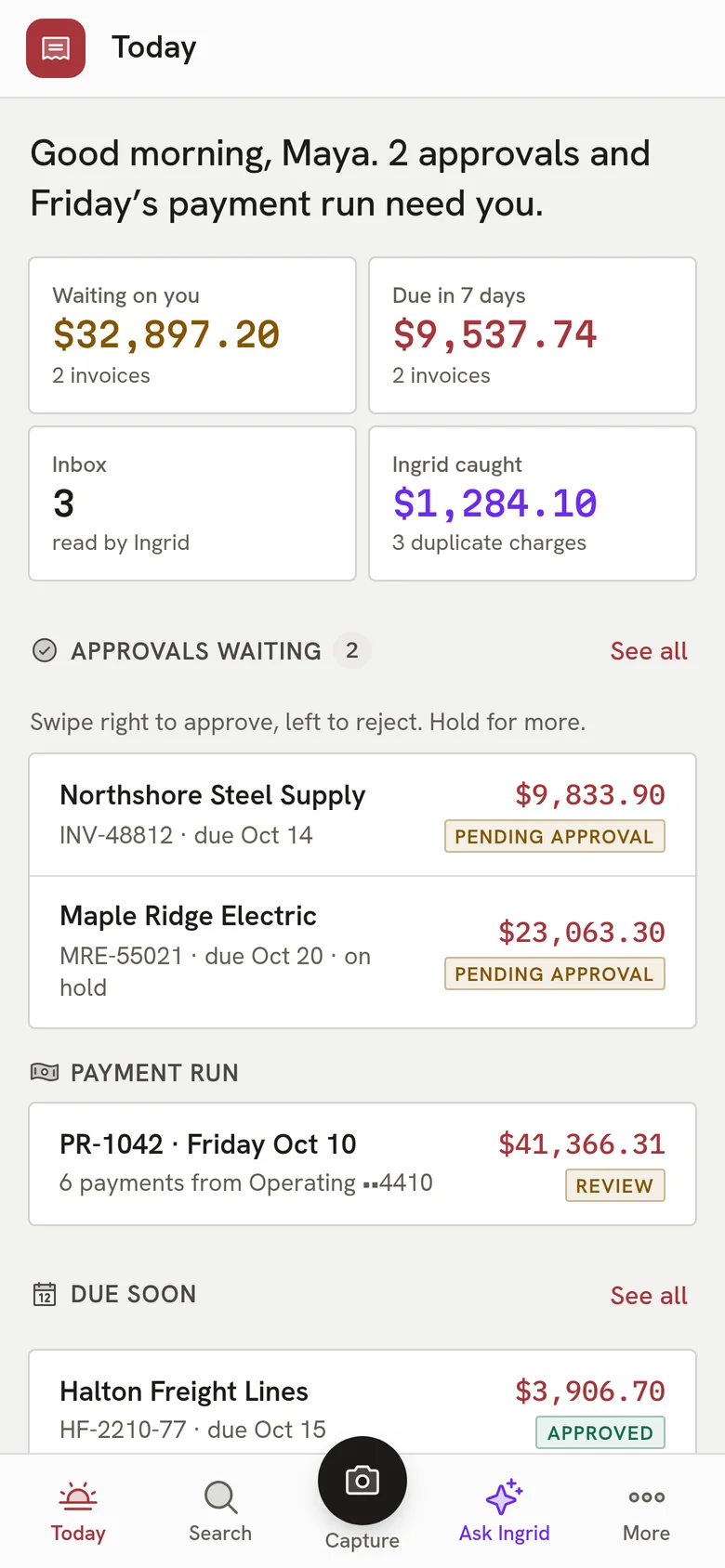
  • Camera capture straight into the review queue.
  • See what is waiting on you, and what is due this week.
  • The same colours and records as the desktop app.
Ingrid Payables on a phone: a Today screen with approvals waiting, the next payment run and invoices due soon.
Everything Payables does

The complete list. No asterisks.

All 82 capabilities, each checked against the product as it ships today. Anything still being built is marked.

Showing 82 of 82 features

Capture08

  • Drag-and-drop upload queueDrop PDF, PNG, JPEG, GIF or WebP files and each becomes its own draft in a review queue.
  • Dedicated AP email addressEach company gets its own address; vendor invoices emailed there land in the AP Inbox.
  • Sender allowlist and quarantineMail from unknown senders is held for a person to allow or block, never bounced to the vendor or silently dropped.
  • Email body as invoiceWhen an email has no attachment, Ingrid can read the invoice from the email text.
  • Inbox convert to draftAn inbox item becomes a draft invoice with the vendor's terms and currency applied; it can also be rejected or deleted.
  • Manual invoice entryKey an invoice or credit memo by hand with vendor, number, dates, terms, tax code and lines.
  • Phone camera captureOn a phone, take a photo of an invoice, check the header fields Ingrid read, and create the draft in one tap.
  • Recurring invoice templatesTemplates for regular invoices (weekly to annual) draft themselves each period; a person submits them.

Reading and review07

  • Fields read with confidenceIngrid reads vendor, number, dates, totals, tax and line items, with a confidence score on each field.
  • Not-an-invoice detectionDocuments that are not invoices are flagged instead of becoming drafts.
  • Vendor matching from the documentThe extracted vendor is matched to a Spire vendor, with the match confidence shown.
  • Create vendor from extractionA new vendor can be created from what Ingrid read, in Ingrid and in Spire.
  • Corrections kept beside Ingrid’s readingA reviewer's corrections are stored with who and when, and the original reading is never overwritten.
  • Tampering and phishing warningsIngrid warns on hidden text in a PDF, instructions aimed at Ingrid, and a sender who does not usually invoice for that vendor.
  • Per-vendor price unitsVendors that price per 100 or per 1000 are remembered, and the unit is applied only when it makes the line add up.

Coding, tax and FX10

  • GL accounts learned per vendorExpense and accrual accounts are learned from past invoices: suggested first, then predicted once enough invoices agree.
  • Split a line across GL accountsDivide a line's expense across accounts by dollars or percent; the parts must add up to the cent.
  • GL entry overrideReplace the suggested expense side of the journal as a whole entry; it must balance and is audited.
  • GL preview matches the postThe GL entry shown on the invoice is built by the same code that writes the post.
  • Canadian tax handlingGST, HST and QST post to each tax code's own account; PST and other non-recoverable tax is spread into the expense lines.
  • Confirm tax that differsWhen an invoice's tax does not match the vendor's Spire tax code, a person confirms it before it posts, and that is logged.
  • Freight and credit memosFreight posts to its own account, and credit memos are entered and stored the way Spire keeps them.
  • Multi-currency invoices and paymentsInvoices, batches and dashboard totals carry their own currency, with base-currency figures shown alongside.
  • Choose the exchange rateIn developmentPost a foreign invoice at a chosen rate (historical market rate, an override, or Spire's) instead of Spire's table rate.
  • Closed-period checkAn invoice dated into a locked Spire GL period is stopped before anything is written, with a plain message.

Duplicates and controls06

  • Duplicate detectionExact repeats are refused; the same number with a different total needs a person to confirm it is a separate invoice.
  • Re-enter after a credit memoAn invoice can be entered again once a credit memo has reversed the original, and the history says so.
  • Submit-time policy checksOn submit, Ingrid checks totals, tax and duplicates and either warns (with acknowledgement) or blocks.
  • Invoice and vendor holdsHold an invoice from posting and payment; Spire holds and vendor holds are respected too.
  • Void with a trailUnposted invoices can be voided by users with delete rights; posted ones are reversed in Spire instead.
  • Anomaly alertsUnusual amounts for a vendor, vendor spikes, near-duplicate vendor names and invoices for inactive vendors surface on the dashboard.

Approvals06

  • Approval chainsMulti-level chains matched by amount range and vendor, with any-one or all-must-approve per level and level amount thresholds.
  • Approve, reject, request infoApprovers approve, reject or ask the submitter for information, singly or in bulk.
  • DelegationsAn approver can delegate to a colleague for a period, and revoke it.
  • Segregation of dutiesA submitter cannot approve their own invoice, and dual approval cannot be cleared by one person through a delegation.
  • No-matching-chain policyEach company chooses whether an invoice no chain covers posts at once or goes to its AP approvers.
  • Approver email and SMSApprovers on the next level get an email, and a text if set up, when an invoice needs them.

Purchase orders and accruals08

  • Purchase orders from SpirePOs, their lines and receipts are synced from Spire and shown with the invoices matched to them.
  • Invoice line to PO line matchingInvoice lines are matched to PO lines by part number, then description, and a person can change any match.
  • Three-way match and varianceInvoice, PO and receipt are compared within a tolerance, with the currency part of a variance shown separately.
  • Over-invoice checkAn invoice that invoices more than a PO has left to invoice is held instead of posting.
  • Posting path routingEach invoice is routed by PO and receipt status: reverse the accrual, hold for review, or post as a direct expense.
  • Accrual account choiceUse Spire's accrued purchases account or a company accrual account, remembered per vendor.
  • Native Spire PO invoice matchIn developmentPO invoices go through Spire's own Purchasing invoice step instead of a plain AP invoice.
  • Review queueInvoices held for a PO, receipt or account problem wait here with the decision to make; holds are rechecked automatically.

Posting to Spire06

  • Direct posting to SpireApproved invoices post into Spire through its own API, so Spire's balances move as if keyed in Spire.
  • Read-back after postingAfter each post Ingrid reads the transaction back from Spire and records only what Spire actually holds.
  • Safe retries and reconcilePosts run in the background with automatic retry; a post that may have reached Spire is flagged for a person to reconcile, never re-sent.
  • Post as your own Spire userUsers can link their own Spire login so Spire's history names them; the password is sealed in your browser and passed only to the connector on your server.
  • Documents and notes in SpireThe invoice document and notes are attached to the record in Spire Communications.
  • Vendor changes written to SpireNew vendors, contacts, addresses, tax codes and reactivations are written to Spire through its API.

Payments06

  • Payment batchesBuild a batch from payable invoices, check it, then process it into Spire one payment per vendor.
  • Pre-check and pay the restBefore processing, every invoice that cannot be paid is named, so the rest of the batch can still go.
  • Early-payment discountsTake available discounts on batch items, and see discount opportunities on the dashboard.
  • Void a batchVoid a payment batch with the record kept and a VOID stamp shown.
  • Cheque numbers from SpireSpire's cheque number is shown on each posted payment.
  • Payment due digestA daily email lists invoices overdue or due soon that a payment run could take.

Vendors02

  • Vendor list and detailVendors with balance, invoices, contacts, terms and attachments, kept current from Spire.
  • Vendor risk and spendEach vendor shows a risk score and spend history; top vendors by spend are on the dashboard.

Dashboard and reports06

  • AP dashboardPayables totals, aging, status mix, payment forecast, due for payment, discounts, top vendors, anomalies and processing metrics.
  • Invoice list with exportSearch, filter, sort and aging chips over all invoices, with CSV export of every matching row.
  • Received, Not Invoiced reportLists the received POs Ingrid is still waiting on an invoice for, behind the accrued purchases balance.
  • Accrual reconciliation reportCompares Spire's accrued purchases, freight and duty balances with what Ingrid shows outstanding.
  • Routing decisions reportShows which posting path each invoice took and why.
  • Company report templatesUpload, preview and publish the company's report layouts in the shared report library.

Audit, sync and administration10

  • Audit log and invoice timelineEvery change is recorded with who, when and a before/after diff, on each invoice and in a company-wide log.
  • Activity feedA filterable feed of recent AP activity across the company.
  • Spire sync and connector statusVendors, GL accounts, AP transactions, POs, terms and tax codes sync from Spire every few minutes, with connector status and manual sync.
  • Data health checksA daily check compares Ingrid's records with Spire and lists quarantined rows that can be retried.
  • Live updatesScreens pick up changes made by others or by Spire sync without a reload.
  • Permissions per moduleView, edit and delete rights are set per AP area, and buttons follow them.
  • Idle sign-outUsers are warned and then signed out after an idle limit the company sets, enforced on the server.
  • Notification settingsCompany switches for new invoice, approval needed, payment due and sync error mail, plus each user's own mutes.
  • Document naming patternStored documents are named by a company pattern such as date, vendor and amount.
  • Documents filed to Ingrid VaultIn developmentAP documents are registered with Ingrid Vault, the company document library.

Ask Ingrid, mobile and other apps05

  • Ask Ingrid panelAsk about open invoices, approvals waiting on you or what is due, beside the invoice you are looking at.
  • Draft and post by askingIngrid can propose a draft invoice or a post; nothing is written until the person clicks Confirm.
  • Phone layoutA phone shell with Today, approvals to swipe, invoices, inbox, payments, vendors, search and Ask.
  • Drafts from Bank RecIngrid Bank Rec can create AP draft invoices from bank lines, through the same path as a hand-saved draft.
  • Payments visible to Bank RecBank Rec reads AP payments and cheques (read-only) to match them to statement lines.

ERP support02

  • Works with SpireReads from and, where the app writes, posts to Spire.
  • AccountMate supportComingAccountMate support is coming soon.

Put Payables on your own invoices.

Bring your vendors, your approval rules and your questions. We will show you how Payables handles them.

Book a demo