
Ingrid Receivables · Accounts receivable for Spire

Get paid, politely and on time.

Aging, collections, reminders and statements on your Spire customers, with every reminder re-checked against fresh Spire data before it goes.

The real Receivables screen · sample data · nothing you do here is saved
Book a demo
ar.ingrid-app.com/dashboard
Ingrid Receivables dashboard with aging, days sales outstanding and the cash forecast.

The real Receivables screens, live in your browser with sample data.

Works with
SpireReceivables synced, each customer balance checked against Spire.
Reminders
Four stagesDunning playbooks with editable wording and attachments.
Holds
AutomaticDisputes, promises to pay and unapplied cash pause reminders.
Insight
DSO · CEIA cash forecast from each customer’s payment history.
How Receivables works

Reminders that know when to stop.

Every reminder is re-checked against fresh Spire data before it sends, and held when there is a dispute, a promise or cash not yet applied.

  1. SyncedSpire receivables, balances checked
  2. AgedIn your own aging periods
  3. RemindedFour-stage playbooks
  4. HeldDisputes and promises pause it
  5. PaidForecast and DSO updated
Receivables, in the product

Who owes what, and what happens next.

Scroll through the real Receivables screens.

  1. 01 Dashboard

    The money coming in.

    Aging, DSO and collection effectiveness, with a cash forecast built from how each customer actually pays.
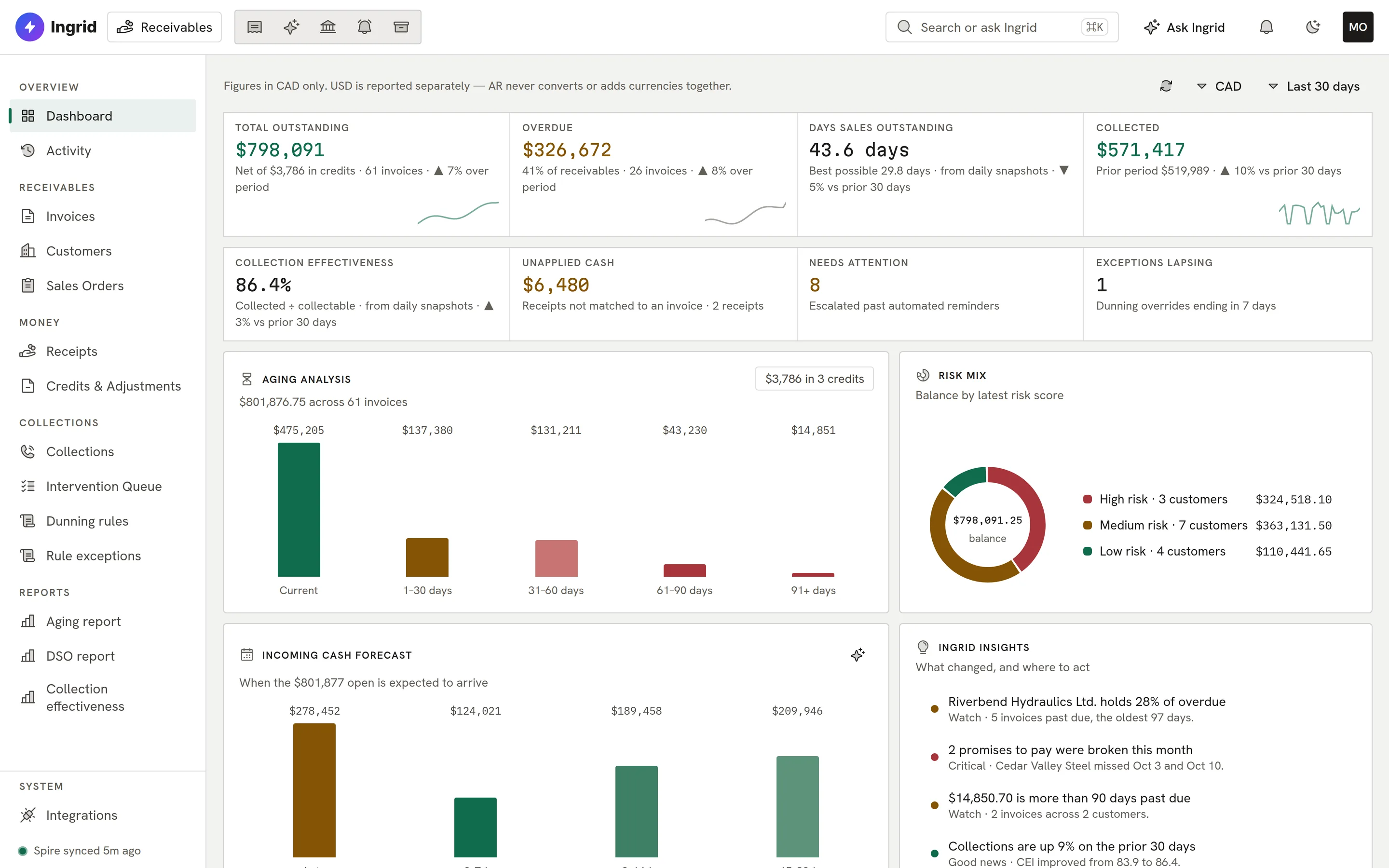
    Receivables dashboard.
  2. 02 Aging

    Aging in your own buckets.

    Drill from any cell to the invoices behind it, and export to CSV.
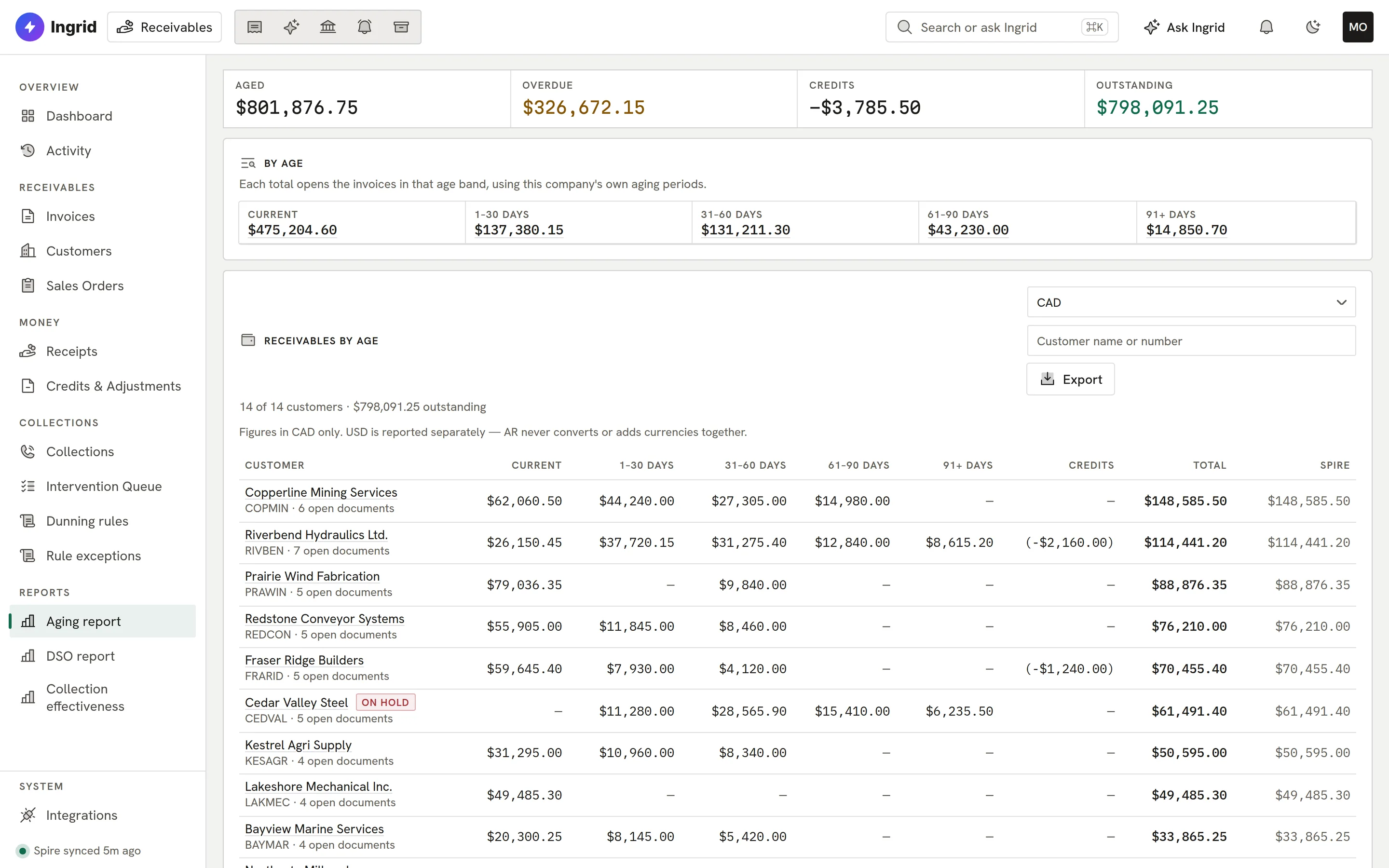
    Aging report.
  3. 03 Customer

    One record per customer.

    Balance, open invoices, promises to pay and disputes, with the whole collection history.
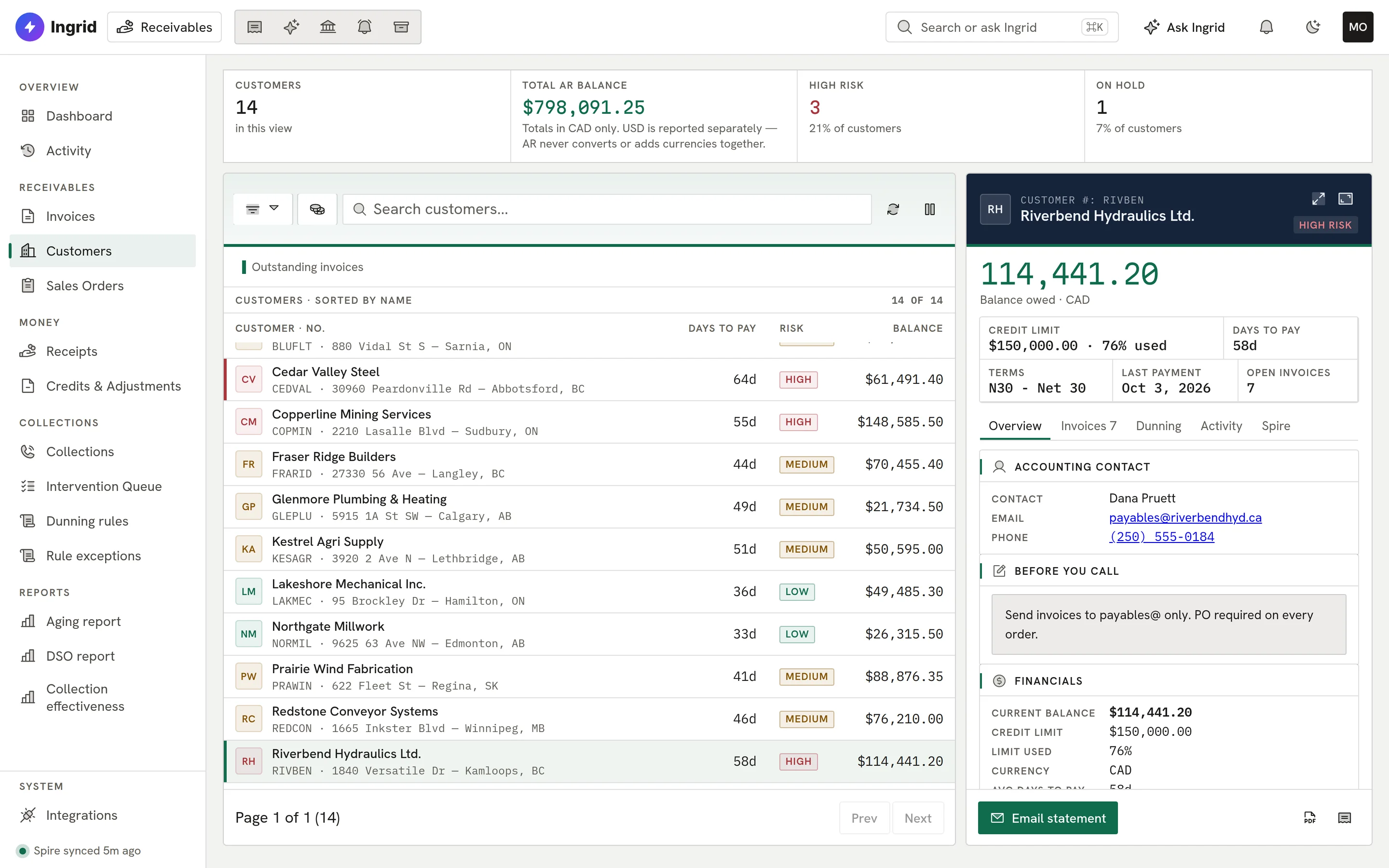
    A customer record.
  4. 04 Collections

    The accounts that need a person.

    A queue of overdue customers, so nobody is chased twice and nobody is forgotten.
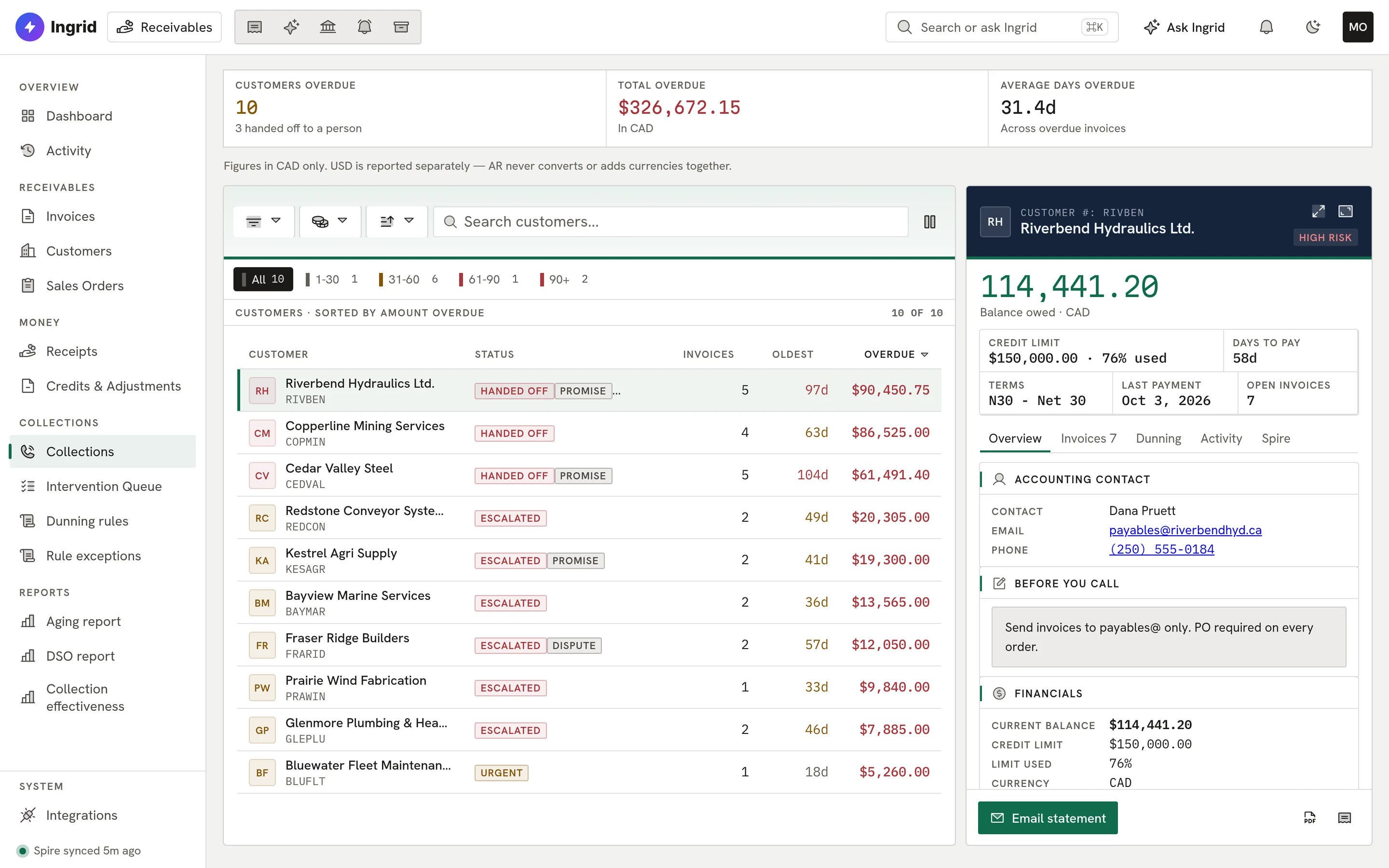
    Collections queue.
  5. 05 Reminders

    Four stages, your words.

    Dunning playbooks with editable messages and a choice of attachments for each stage.
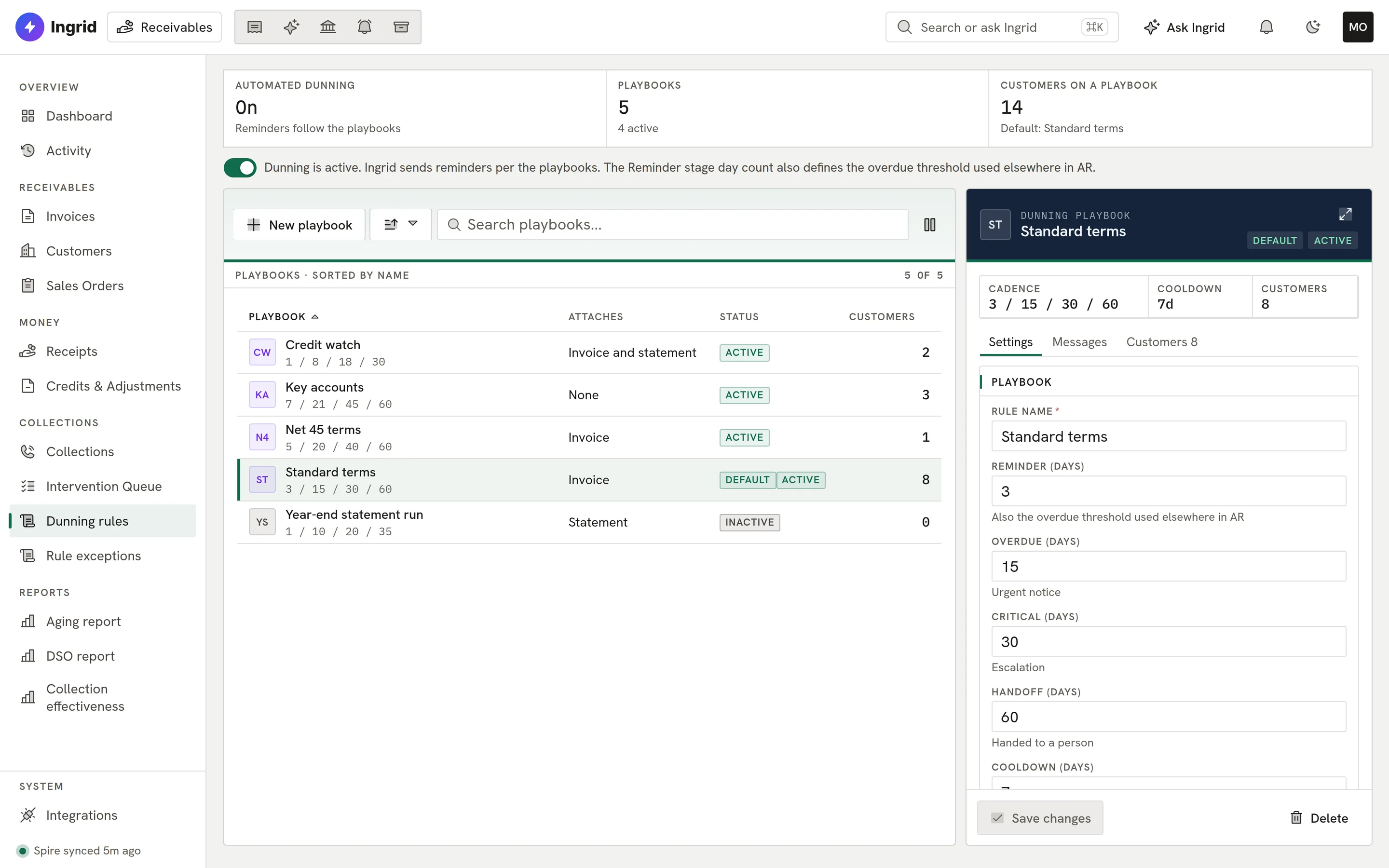
    A dunning playbook.
  6. 06 Statement

    Statements, confirmed before they go.

    Download or email a statement PDF, with a confirmation step before anything is sent.
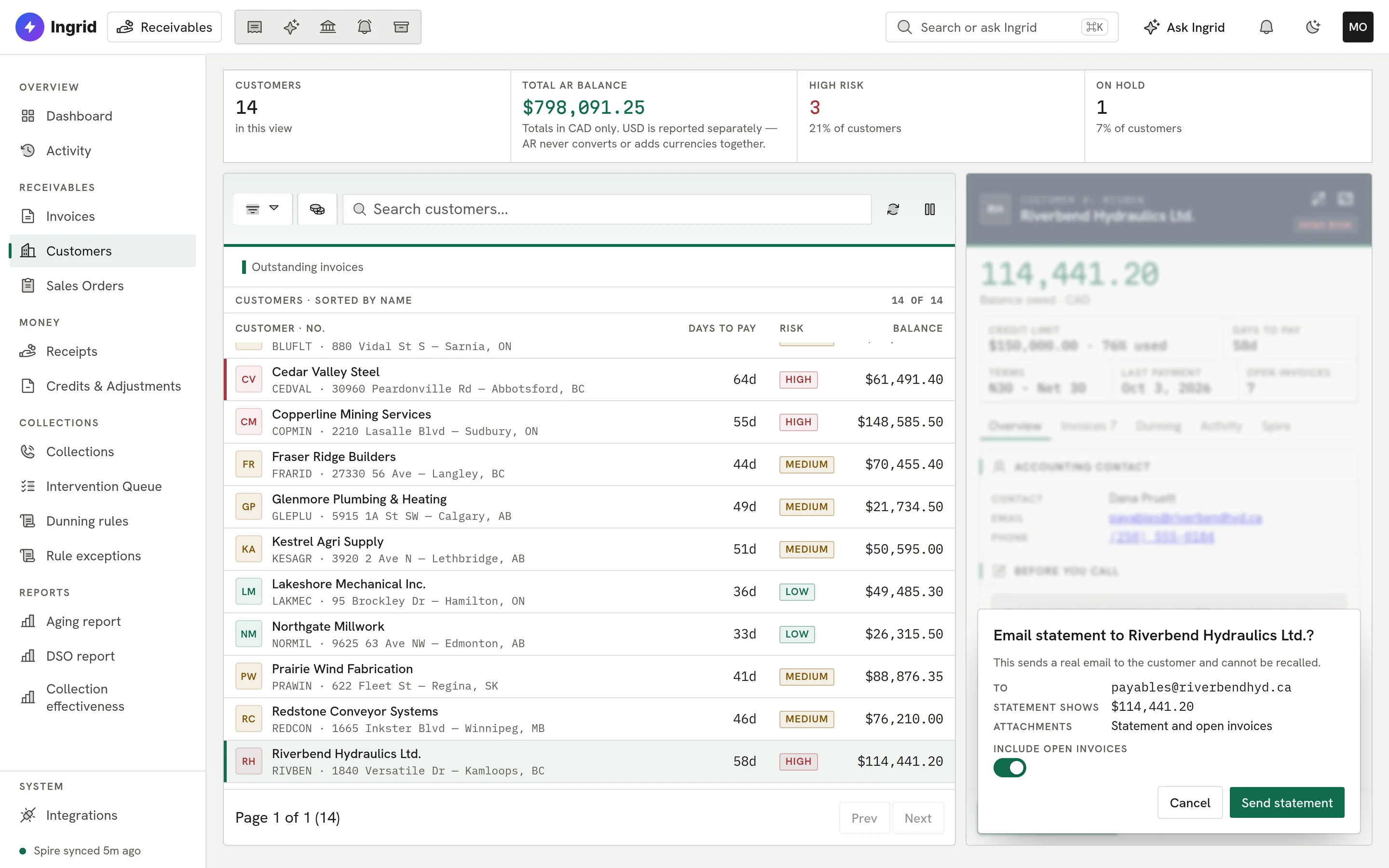
    Email statement confirm step.
ar.ingrid-app.com/dashboard
Receivables dashboard.
Playground

Try Receivables. Click anything.

The real Receivables screens with sample customers, in your browser.

ar.ingrid-app.com/dashboard
Aging, DSO, forecast

This is the real Receivables screen running in your browser with sample data. Click anything; nothing is saved and nothing leaves the page.

Built for collections

Firm, fair and on the record.

Receivables works with Ingrid off: risk scoring falls back to rules, and every action is a person’s.

  • Spire sync

    Receivables synced through the connector, each balance checked against Spire.

  • Aging

    Your own aging periods, drill-down from every cell, CSV export.

  • Dunning playbooks

    Four stages with editable wording and attachments.

  • Automatic holds

    Disputes, promises to pay and unapplied cash pause reminders.

  • Promises tracked

    Promises to pay tracked as kept or broken; disputes logged.

  • Statements

    Statement PDFs to download or email, with a confirm step.

  • Forecast and DSO

    A cash forecast from payment history, plus DSO and collection effectiveness.

  • Ask Ingrid

    Ask about any customer; a person confirms every action.

Everything Receivables does

The complete list. No asterisks.

All 64 capabilities, each checked against the product as it ships today. Anything still being built is marked.

Showing 64 of 64 features

Spire sync and data06

  • Spire receivables syncCustomers, open AR transactions, receipts, credits, invoice lines and sales orders are pulled from Spire through the Ingrid Data Connector.
  • Connector push intakePages pushed by the connector relay are written to AR in bulk, one statement per page.
  • Sync now and connector statusThe Integrations screen shows pairing, liveness and when data last arrived, with a manual sync button.
  • Balance check against SpireEach customer's Ingrid total is shown beside Spire's balance, and a balance Spire holds with no synced documents is called out.
  • Screens refresh on changeOpen screens poll for changed records and refetch only the queries that show them.
  • Spire Communications notesRead, add and edit a customer's Spire CRM notes and attach files that go straight to Spire.

Dashboard and insight06

  • Receivables dashboardOutstanding, overdue, unapplied cash, aging, risk mix, top overdue customers and collections activity on one page, each figure linking to the list behind it.
  • Incoming cash forecastExpected payment timing per open invoice, from each customer's own payment history, with fallbacks labelled.
  • Forecast explained by IngridOn request, Ingrid writes a short plain-English explanation of the computed forecast without inventing figures.
  • Ingrid InsightsRule-based callouts on the dashboard, such as overdue concentration, broken promises and lapsing exceptions.
  • Trends over timeReceivables trend, aging over time and cash in versus credit sales, from daily snapshots.
  • Activity feedEvery reminder, call, note, pause and hand-off with who did it and when, filterable by type, with totals for the whole filter.

Invoices, customers and documents07

  • Invoice list and detailSearch, sort and filter invoices by aging bucket, risk, dunning rule, status, disputed or promised, with a detail pane showing lines and the collection timeline.
  • Invoice PDFOpen a one-page PDF of any invoice, generated by Ingrid from the synced data.
  • Customer list and profileCustomers with balance, credit limit, terms, contacts, Spire settings, open invoices, risk and assigned rule.
  • Customer risk scoringScore a customer's payment risk into low, medium or high, and filter the customer list by the latest score.
  • Receipts listCash received, with how much of each receipt is still unapplied and which invoices it paid.
  • Credits and adjustmentsCredit and debit memos with the amount still remaining, oldest unapplied first.
  • Sales order pipelineOpen orders by state: ready to invoice, backordered, on hold, quotes and cancelled, with search and totals.

Collections06

  • Collections hubCustomers with overdue balances ranked by amount, with what to know before you call and a place to log the call.
  • Intervention queueInvoices that automation handed to a person, each saying why it stopped and what to do next.
  • Promises to payRecord a promised amount and date; Ingrid marks it kept or broken from the balance and holds reminders until the date plus three days.
  • DisputesOpen, resolve or withdraw a dispute on an invoice; a disputed invoice is not chased.
  • Pause, resume and resolveTake an invoice out of automated reminders, put it back, or mark it resolved and reopen it, with a reason recorded.
  • Calls, emails and notesLog calls, manual emails, responses and notes against an invoice or a customer; edits keep their history.

Automated reminders (dunning)10

  • Dunning playbooksRules with four stages (reminder, urgent, escalation, hand-off to a person), each with its own day count and editable subject and body.
  • Assign customers to rulesPick which customers follow which playbook, with a default rule and usage counts.
  • Customer exceptionsExclude a customer or give them their own timing, with a reason and a date the exception lapses.
  • Automatic holdsReminders are held for disputes, open promises, exceptions, and invoices fully covered by unapplied cash or open credits.
  • Re-check before sendingEach queued reminder is checked again against a Spire read under 15 minutes old, so a payment that just landed cancels it.
  • Send controlsA company-wide on/off switch, quiet hours, a per-invoice cooldown, a minimum balance and a sweep interval you set.
  • AttachmentsEach rule attaches the invoice PDF, the account statement, both or nothing, and the email says what is attached.
  • Branded, verified sendingReminders go out from Ingrid's verified sending domain under your company name, with replies going to your address.
  • Bounce and complaint suppressionAddresses that hard-bounce or report spam stop receiving customer email, and the screen says why a send was suppressed.
  • SMS remindersComingText-message reminders.

Statements02

  • Customer statement PDFDownload a statement of account listing open documents, credits and the total outstanding.
  • Email a statementEmail the statement, optionally with each open invoice attached, after a confirmation that shows the recipient and balance.

Cash application and payments08

  • Apply-cash worklistCustomers with unapplied cash and open invoices, with an oldest-first suggestion of where the cash goes.
  • Apply cash to invoices in SpireIn developmentPreview applying unapplied cash against live Spire, confirm, then send once and read both documents back to the cent.
  • Second-person approvalIn developmentCash writes at or above a company threshold need a second person, other than the preparer, to confirm.
  • Record a receipt in SpireIn developmentPrepare and confirm a manually entered customer receipt, which is posted to Spire, verified against the ledger and optionally applied.
  • Card payment intakeIn developmentSigned Stripe and Global Payments webhooks feed a payments worklist and can prepare Spire receipts.
  • Foreign-currency cash applicationIn developmentApplying cash across different exchange rates with FX gain or loss posting.
  • Post AR invoices to SpireIn developmentPost an invoice through Spire's sales pipeline so each line keeps its revenue account.
  • Credit application and credit memosComingApply credits and create credit memos from AR.

Reports05

  • Aging reportReceivables by customer in your own aging periods, credits in their own column and Spire's balance beside each row; every cell drills to its invoices.
  • CSV exportExport the aging report to CSV with an all-customers totals row.
  • DSO reportDays sales outstanding by period with the formula shown and a trend chart.
  • Collection effectiveness reportCollection effectiveness index by period with the formula and trend.
  • Company report templatesUpload reference PDFs and manage company report templates in the shared report library.

Ask Ingrid04

  • Ask Ingrid panelAsk a plain-English question from any AR screen, with the record you are viewing passed as context.
  • Confirm before actingActions Ingrid proposes show as cards that a person must confirm; nothing executes from the model alone.
  • AR data for Ask IngridIn developmentAsk Ingrid can look up open items, aging, promises, disputes and reminders, and act on collections once you confirm.
  • Works with Ingrid offRisk scoring falls back to rules and the forecast is computed without Ingrid, so AR works when a company turns Ingrid off.

Settings, security and platform08

  • Company settingsSender name and reply-to, timezone, quiet hours, sweep interval, minimum balance and four aging periods.
  • Per-currency viewsTotals are shown one currency at a time with a currency switch; the aging matrix lists each currency separately.
  • Module permissionsAccess, create, edit, delete, approve and export are granted per AR module, plus a separate cash role for receiving payments.
  • Per-company app accessOnly users of companies with AR access can sign in to it.
  • Your data stays separateEach company’s receivables are kept separate from every other company’s, not only in the app.
  • Write audit trailEvery change sent to Spire is recorded and cannot be edited.
  • UI Next interfaceA new interface for every AR screen with peek, expand and focus views, a command palette and keyboard shortcuts.
  • Bank Rec receipt feedAR receipts are offered to Ingrid Bank Rec for matching against bank statement lines.

ERP support02

  • Works with SpireReads from and, where the app writes, posts to Spire.
  • AccountMate supportComingAccountMate support is coming soon.

Bring in the cash you’re owed.

Tell us how your team chases payment today. We will show you Receivables on your kind of customers.

Book a demo