
Ingrid Ask Ingrid · Ingrid assistant

Ask anything. Confirm everything.

A colleague that reads your Spire books, answers with its sources, and prepares quotes, orders and records for you to confirm. It has its own workspace and also lives as a panel inside every Ingrid app.

The real Ask Ingrid screen · sample data · nothing you do here is saved
Book a demo
os.ingrid-app.com
Ask Ingrid: a prepared purchase order showing the exact fields it would write, a policy warning, and Confirm and Decline.

The real Ask Ingrid screen, live with sample data.

Models
Fast and strongA fast model by default, a stronger one for harder steps.
Reads
Live SpirePlain-English answers from typed, permission-checked reads.
Writes
Only on confirmSigned per person, run once, recorded end to end.
Everywhere
Every appThe same Ask panel in Payables, Receivables, Bank Rec and Alert.
How Ask Ingrid works

It can draft. It cannot sign.

Ingrid reads through defined tools, proposes a change as a card with the exact fields, and waits. Only a person’s confirm lets Ingrid’s own code run it.

  1. AskIn plain English
  2. ReadTyped, permission-checked Spire reads
  3. ProposeA card with the exact fields
  4. ConfirmSigned for you, run once
  5. RecordedPrompt to result, append-only
Ask Ingrid, in the product

From a question to a confirmed change.

Scroll through Ask Ingrid on the new Ingrid design.

  1. 01 Ask

    Answers with their sources.

    Ask who is over 60 days, or what is still open with a vendor. Ingrid answers from live Spire reads and links the records it used.
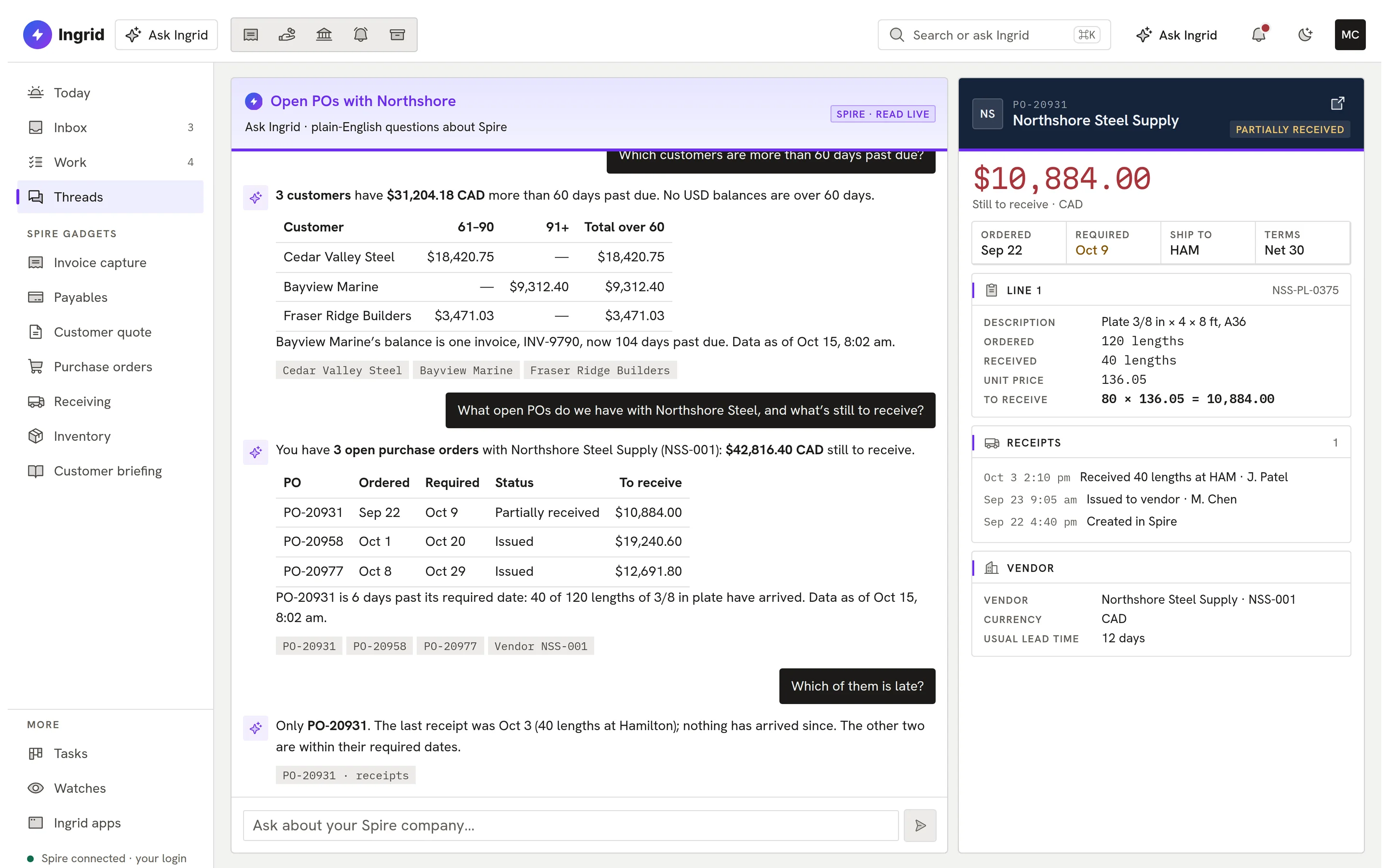
    An answer with cited records.
  2. 02 Propose

    A proposal, not a write.

    Asked to restock, Ingrid prepares the purchase order as a card with every field, and flags that the price is above the last one.
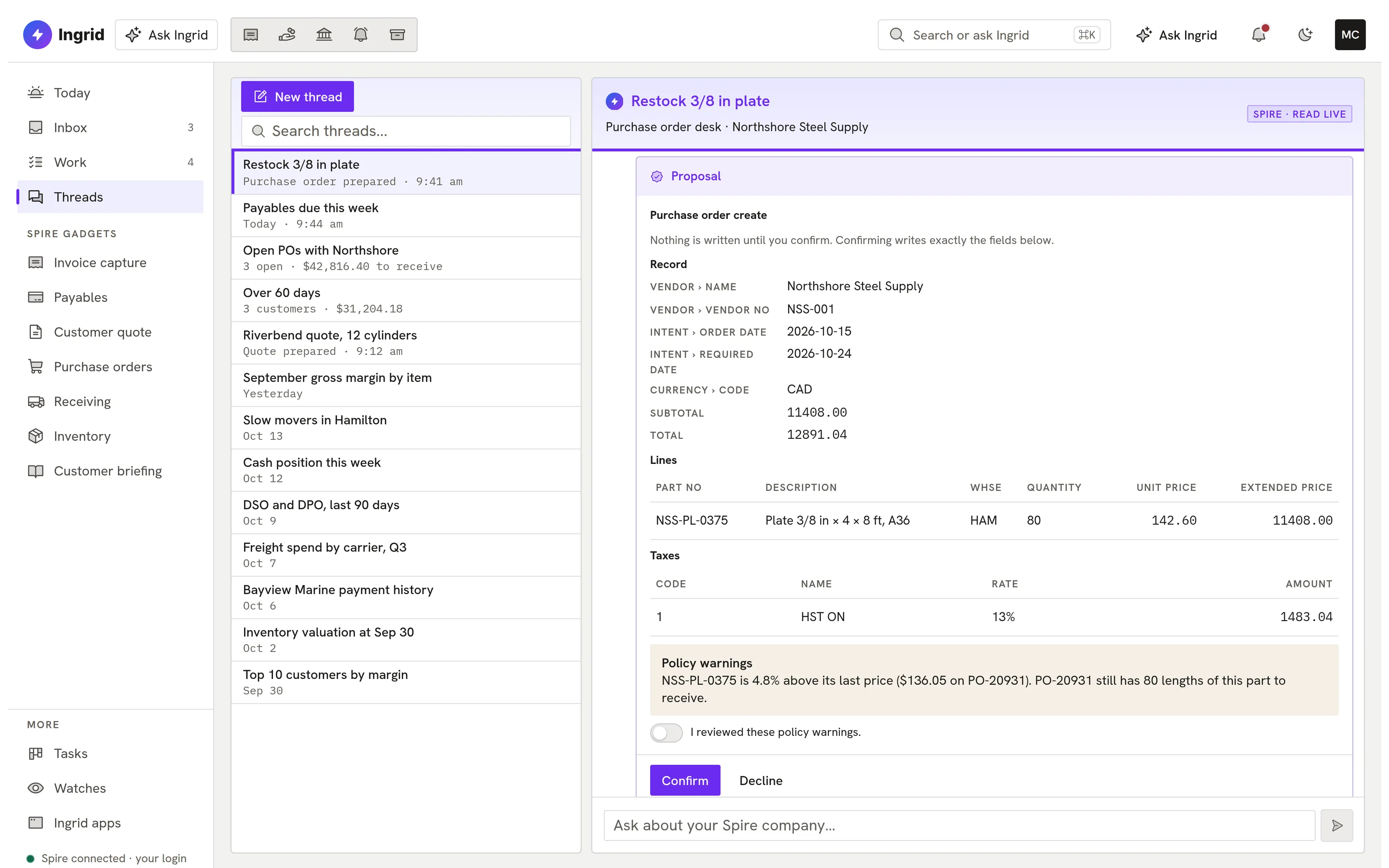
    A purchase order proposal.
  3. 03 Work

    Everything waiting on you.

    The Work queue gathers proposals from every thread, each checked against live Spire before it can run.
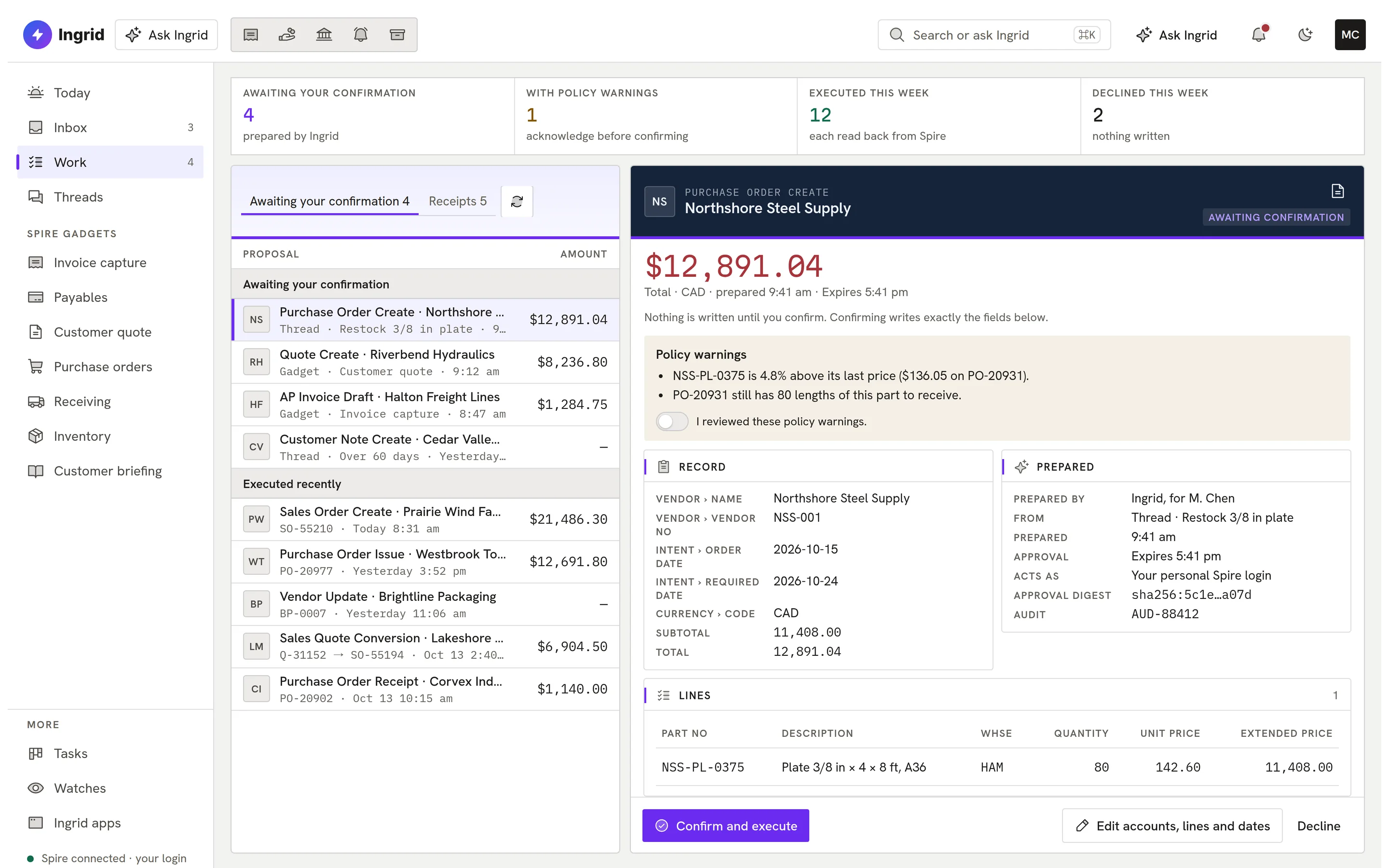
    The Work queue.
  4. 04 Gadgets

    Ready-made Spire Gadgets.

    Nine curated Gadgets such as a customer account briefing, and new ones built on request.
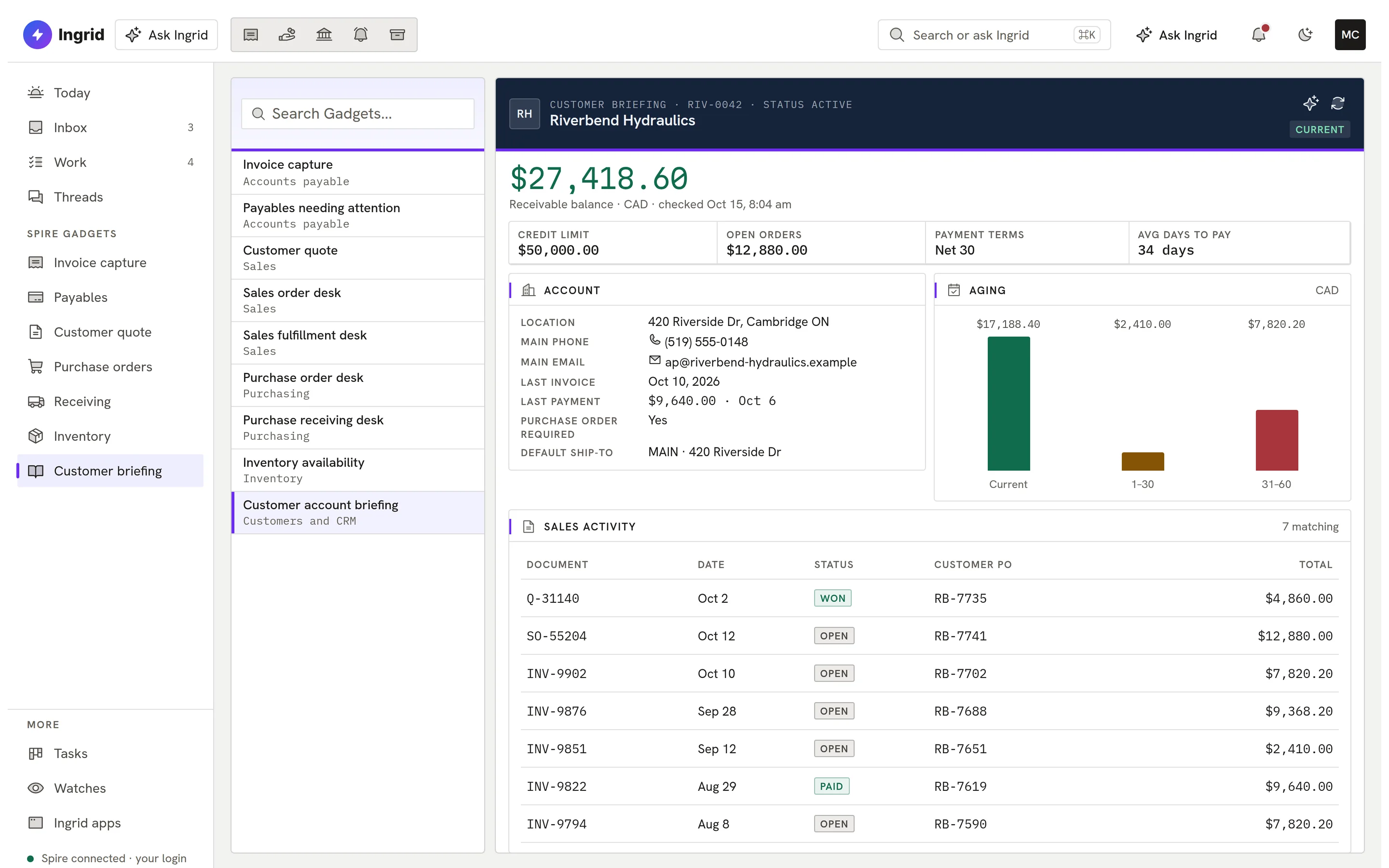
    A customer briefing Gadget.
  5. 05 Every app

    The same Ask panel, in every app.

    Inside Payables, Receivables, Bank Rec and Alert, Ask Ingrid sees the record you are on.
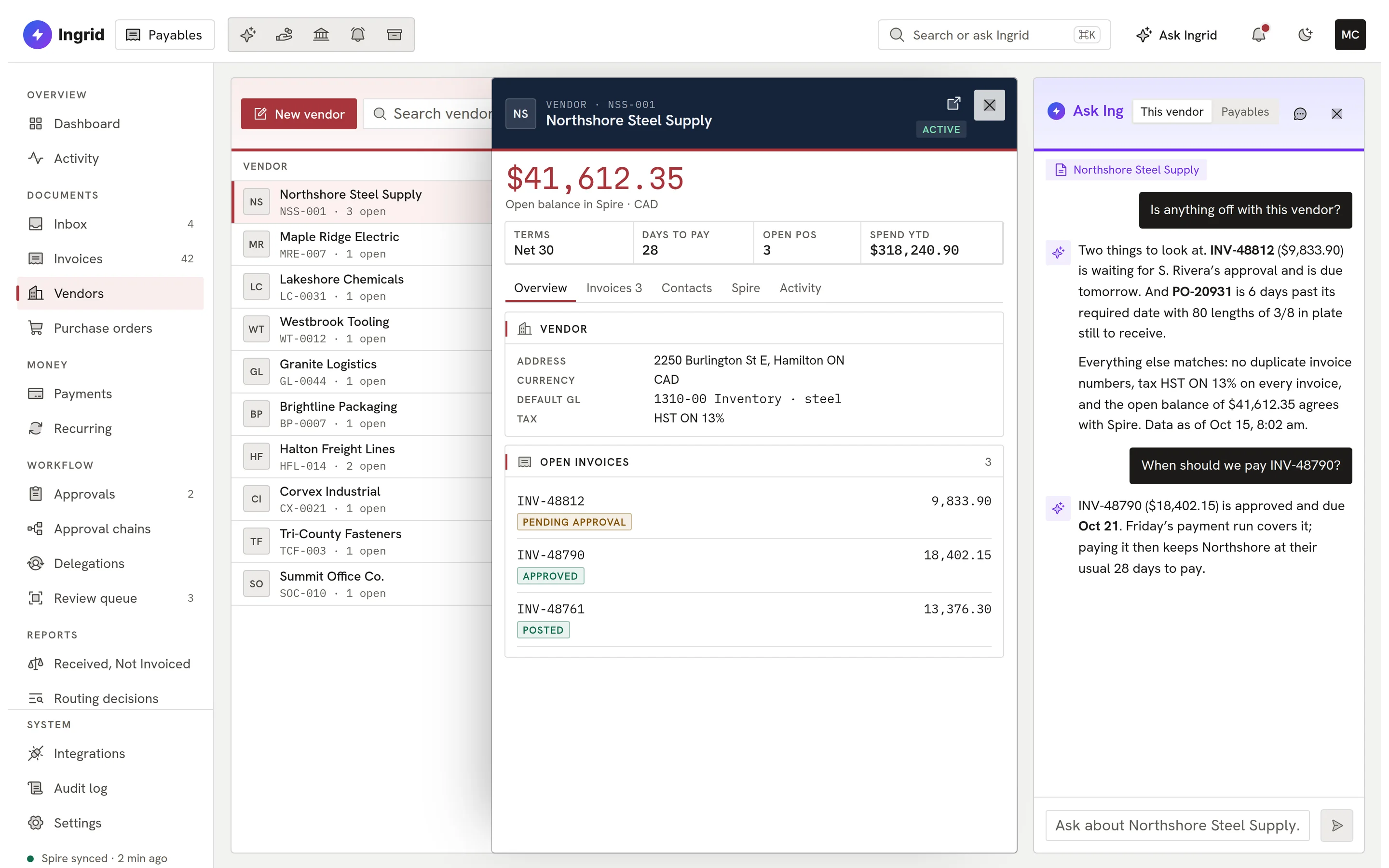
    Ask Ingrid docked in Payables.
os.ingrid-app.com
An answer with cited records.
Playground

Try Ask Ingrid. Decline is always an option.

Review a prepared purchase order, acknowledge the warning, then confirm or decline. Sample data, in your browser.

os.ingrid-app.com
Cited records

This is the real Ask Ingrid screen running in your browser with sample data. Click anything; nothing is saved and nothing leaves the page.

Safety, by construction

Helpful, and kept honest.

Every guardrail is in Ingrid’s code, not in a prompt.

  • Typed reads

    Permission-checked reads through defined tools; never unrestricted access.

  • Confirm to write

    Nothing changes until you confirm; a proposal can be edited first.

  • Signed confirmations

    Each confirm is signed for that person and request; replays are refused.

  • No double writes

    A repeated confirm returns the same result instead of a second write.

  • Append-only audit

    Prompts, tool calls, proposals and results recorded per company.

  • Untrusted text labelled

    Text from documents and emails is treated as data, never as instructions.

  • Your Spire login

    Link your own Spire login so Spire’s history names you.

  • Private to you

    Ingrid is built into every app and kept private: a fast model by default, a stronger one when needed.

Everything Ask Ingrid does

The complete list. No asterisks.

All 59 capabilities, each checked against the product as it ships today. Anything still being built is marked.

Showing 59 of 59 features

Ask about your business10

  • Plain-English questions about SpireAsk about customers, vendors, inventory, sales, purchasing, GL, job costing, production and CRM and get answers read live from your Spire company.
  • Receivables and payables agingSee who owes you, what you owe and how balances age, with each currency kept separate.
  • Sales, margin and inventory analysisSales by customer, item or period, gross margin, ABC classification, inventory turns, slow movers, valuation and period-over-period comparisons.
  • Cash, trial balance and working capitalCash position, GL trial balance, account balances and days sales and payables outstanding computed from the subledgers.
  • Document and order lookupsFind a quote, sales order, invoice or purchase order and read its status, lines, notes and email history.
  • Native Spire PDFs on requestIngrid fetches the PDF Spire itself prints for a quote, sales document or purchase order.
  • AP and AR aging tablesGenerate a current AP or AR aging table from the complete Spire aged ledger with its source time.
  • Data freshness shownAnswers say when the data was read, and unavailable data is reported as unavailable rather than zero.
  • Spire expert referenceIngrid carries the full Spire API v2 reference and a versioned handbook of AP, quote, document and payables procedures.
  • Knows the Ingrid platformIngrid can explain where things are and how to do them across the Ingrid apps.

Prepare work, you approve13

  • Quotes in SpireIngrid prepares a customer quote with current Spire pricing, units, tax and terms, then creates it in Spire after you confirm.
  • Update and convert quotesChange a quote's header or convert an approved quote into a sales order.
  • Sales orders end to endCreate, update, delete and invoice sales orders, with available, committed and backordered quantities shown first.
  • Purchase orders end to endCreate, issue, receive and delete purchase orders using the vendor's exact price records, each step a separate approval.
  • Customer and vendor recordsCreate, update or delete customers and vendors, and add notes to customers, vendors and sales or purchase documents.
  • Invoice capture to AP draftUpload an invoice photo or PDF; Ingrid reads it, matches vendor, GL coding and tax, checks for duplicates and prepares an Ingrid AP draft for approval.
  • Edit the card before confirmingChange GL account, vendor, tax, lines and dates on a proposal, validated against live Spire before you approve.
  • Work queue for approvalsEvery prepared change waits in Work with exactly what will be written, to confirm or decline.
  • Approve from the Ask panelIn Ingrid AP and AR, action cards render and can be confirmed inside the Ask panel through the same rules as Work.
  • Native AP posting from Ask IngridIn developmentPost an approved AP invoice to Spire from Ask Ingrid.
  • GL journals and ledger entriesIn developmentPrepare GL journal entries and AP or AR transaction entries for confirmation.
  • Inventory adjustmentsIn developmentPrepare an inventory adjustment for confirmation.
  • Bank Rec match and recordIn developmentAsk Ingrid can propose bank statement matches and records; records are confirmed in Ask Ingrid.

Gadgets and desks06

  • Nine curated Spire GadgetsReady-made workflows: invoice capture, customer quote, sales order, purchase order, receiving, fulfillment, payables, inventory availability and customer briefing.
  • Inventory availability deskCheck on-hand and availability for a part by warehouse without any model call.
  • Customer account briefingOne page combining a customer's profile, receivable balance, communications and sales orders, with freshness shown.
  • Gadgets built on requestAsk for a view and Ingrid builds a Gadget as a KPI row, table, chart, list, detail panel or filter form.
  • You approve each data sourceA Gadget reads company data only after you approve a card naming the source, fields and rows; you can turn it off any time.
  • Pinned dashboardsIn developmentSaved grids of Gadgets pinned to the Ask Ingrid home.

Reports02

  • Branded company reportsIn developmentSaved reports with your logo, brand colour and header text, exported to PDF and XLSX.
  • Spreadsheet to live reportIn developmentUpload an .xlsx or .csv and Ingrid maps its columns to Spire figures so it refreshes from live data.

Watches, inbox and tasks06

  • Payables watchIngrid checks for due or overdue payables on a schedule and reminds you, with your own thresholds, quiet hours, snooze and dismiss.
  • In-app inboxWatch reminders and notices land in an Ask Ingrid inbox with unread counts.
  • Task boardIngrid and you track follow-ups on a task board; a task never confirms or executes anything by itself.
  • Email alertsIn developmentWatch reminders by email.
  • Scheduled briefingsIn developmentMorning briefings on cash, AP due, AR overdue and yesterday's sales.
  • Custom monitorsIn developmentAsk Ingrid to watch a Spire figure and alert you when it crosses a condition.

Ask Ingrid in every app05

  • Ask panel in Ingrid APAsk about invoices, approvals, payment batches and vendor balances, and confirm action cards, from inside AP.
  • Ask panel in Ingrid ARAsk about receivables and customers, with confirmable action cards, from inside AR.
  • Ask panel in Bank ReconciliationAsk about reconciliation status, unmatched lines, match proposals and statement summaries.
  • Ingrid Vault documentsIngrid can search, list and open your Vault documents and answer from them with citations.
  • Launch other Ingrid appsAsk Ingrid lists the Ingrid apps your company has and opens them from the sidebar.

Safety, control and audit08

  • Typed, permission-checked readsIngrid reads only through named tools that check your company and your Ingrid role; she has no unrestricted access to your data.
  • Nothing changes until you confirmIngrid only prepares a proposal; application code re-checks permission and executes after a person confirms, then reads the record back from Spire.
  • Signed per-user confirmationEach confirmation carries a signed, single-use assertion tied to the person and the exact proposal.
  • No double writesA replayed confirmation returns the existing result, and a write whose response was lost is reconciled, never blindly re-sent.
  • Append-only audit trailQuestions, tool calls, proposals, confirmations and executions are recorded in an audit log that cannot be edited or deleted.
  • Personal Spire loginEach person links their own Spire login, so Ingrid sees and does only what that Spire user can.
  • Untrusted content labelledNames, memos and document text are marked as untrusted data so they cannot instruct Ingrid.
  • Company isolationCompany and person are resolved on every request and re-checked before execution; company identifiers are stripped from anything the model sends.

Models and access07

  • Private to your companyIngrid uses a fast model by default and a stronger one only for harder steps.
  • Documents read by IngridUploaded documents are read by one approved model, with no fallback to others.
  • One set of rules for every appIn developmentOne central service applies your company’s rules and keeps count of usage for every Ingrid app.
  • Bring your own keyIn developmentA company can use its own model provider key, kept sealed and never shown to Ingrid.
  • Provisioned from Platform AdminAsk Ingrid access is assigned per company and person in Platform Admin; unassigned people stay outside.
  • Your own integrationsIn developmentConnect an external REST/JSON system with a sealed API key so Ingrid can read it.
  • Telegram and WhatsAppComingTalk to Ingrid from a messaging app.

ERP support02

  • Works with SpireWorks with your Spire company.
  • AccountMate supportComingAccountMate support is coming soon.

Meet your new colleague.

Bring your questions about your Spire company. We will show you what Ingrid answers, and what it asks you to confirm.

Book a demo