
Ingrid Custom Reporting · Reporting for distributors on Spire

Your numbers, the way you read them.

Custom sales, purchasing and inventory dashboards for distributors, built on live, read-only Spire data, and able to reproduce the reports your team already trusts.

The real Custom Reporting screen · sample data · nothing you do here is saved
Book a demo
Custom Reporting
Sales Explorer: sales by vendor with drill-down.

The real Custom Reporting screen, live with sample data.

Data
Live, read-onlyReads Spire directly. Never writes to it.
Sales
vs budgetBudgets by territory, month-to-date pace and drill-downs.
Inventory
90-day runwayReorder, stock-out, overstock and dead-stock queues.
Built for you
CustomThresholds are your company’s settings, not hard-coded.
Custom Reporting, in the product

From a question to the answer behind it.

Scroll through the real dashboards.

  1. 01 Explorer

    Sales, grouped any way you like.

    Group by vendor, customer or product line, filter, and drill down to the part, as of any date.
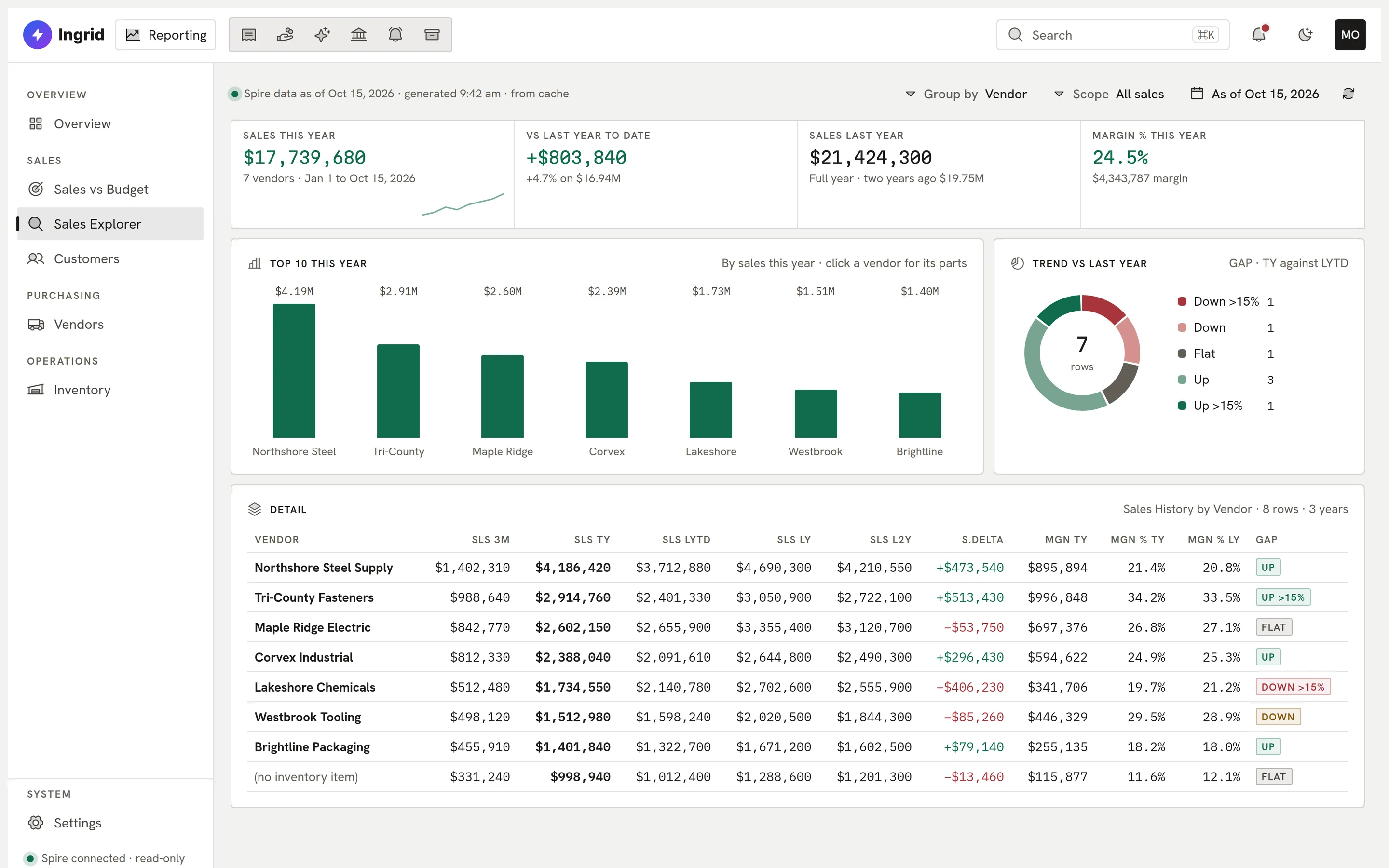
    Sales Explorer: sales by vendor.
  2. 02 Drill

    Click through to the detail.

    Every figure opens onto the records behind it, so the number is never a mystery.
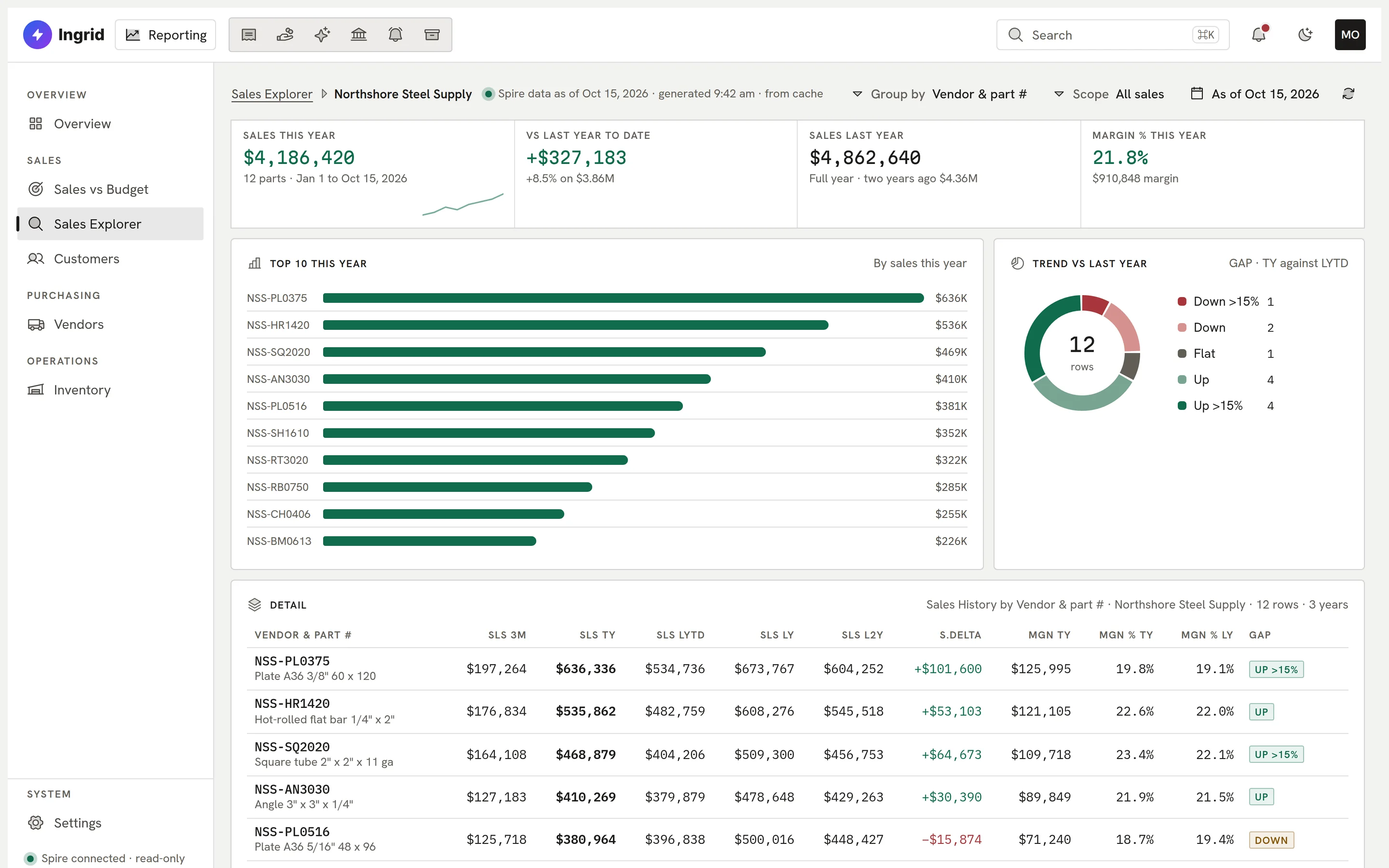
    Sales Explorer drilled into a vendor.
  3. 03 Budget

    Sales against budget.

    Budgets by territory, month-to-date pace and trend, so you know early if a month is slipping.
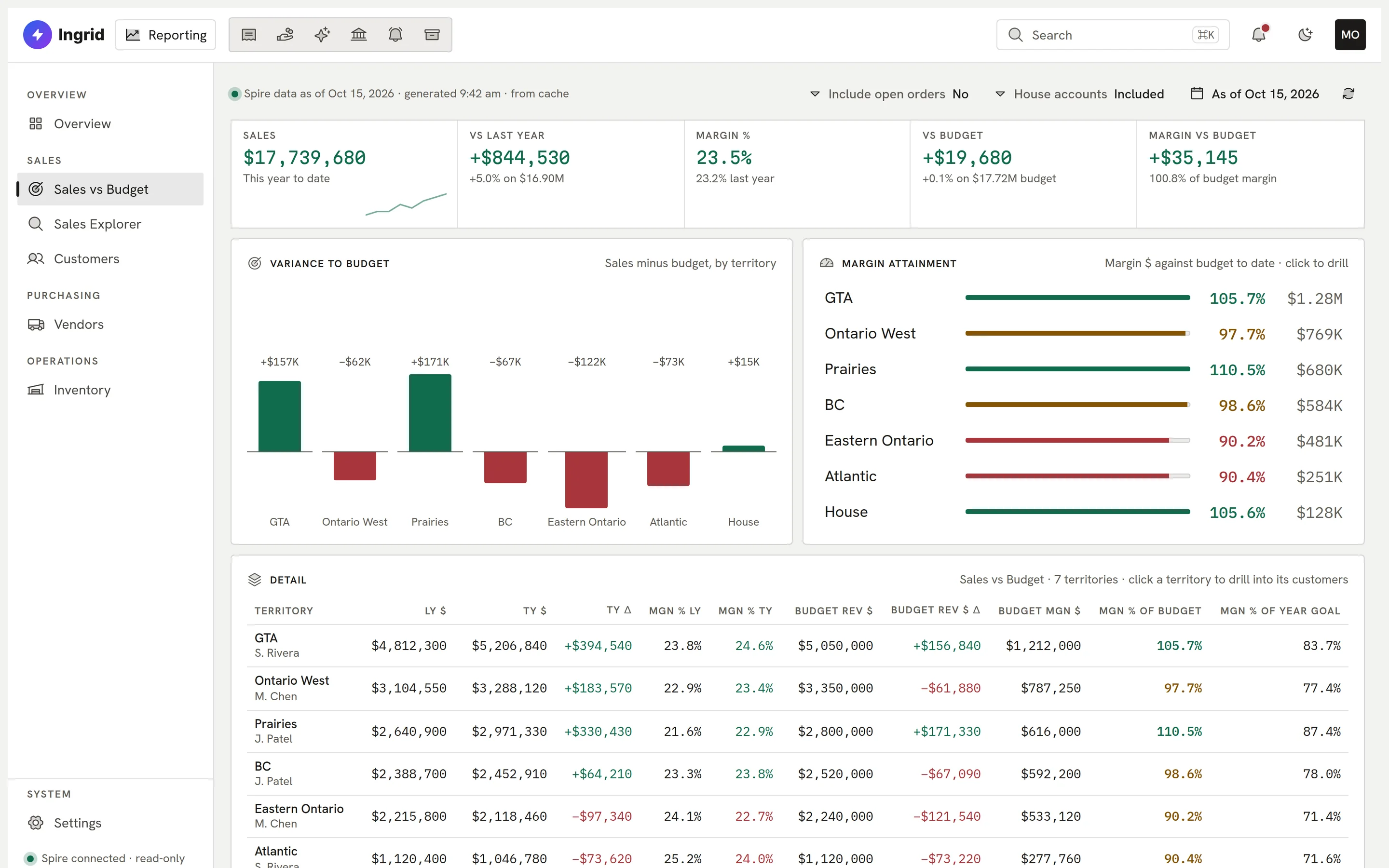
    Sales against budget by territory.
  4. 04 Customers

    Customer health at a glance.

    Segments, health grades and order-rhythm alerts show who is slowing down before they leave.
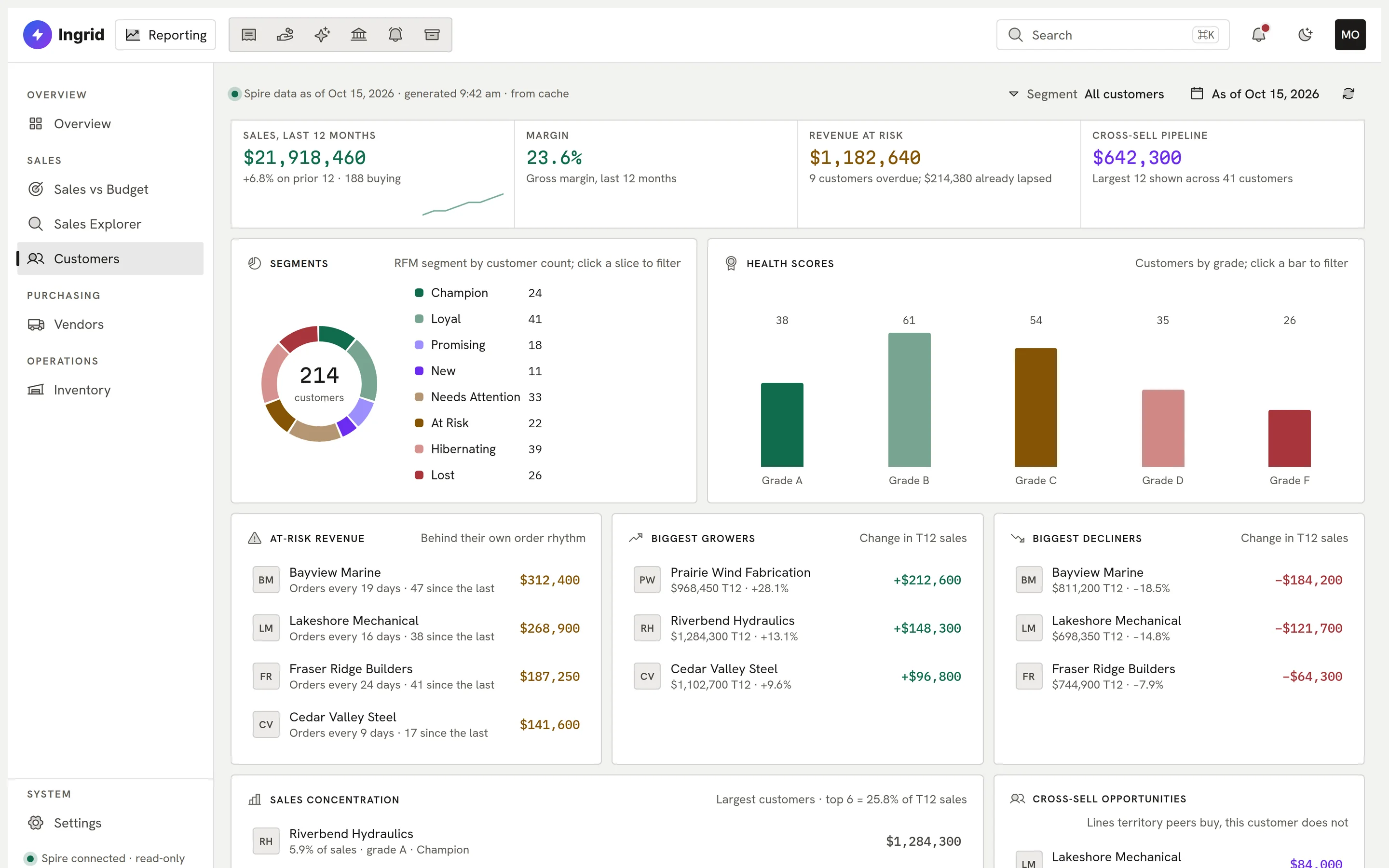
    Customer portfolio.
  5. 05 Vendors

    A scorecard for every vendor.

    Fill rate, on-time receipts and risk flags in one place.
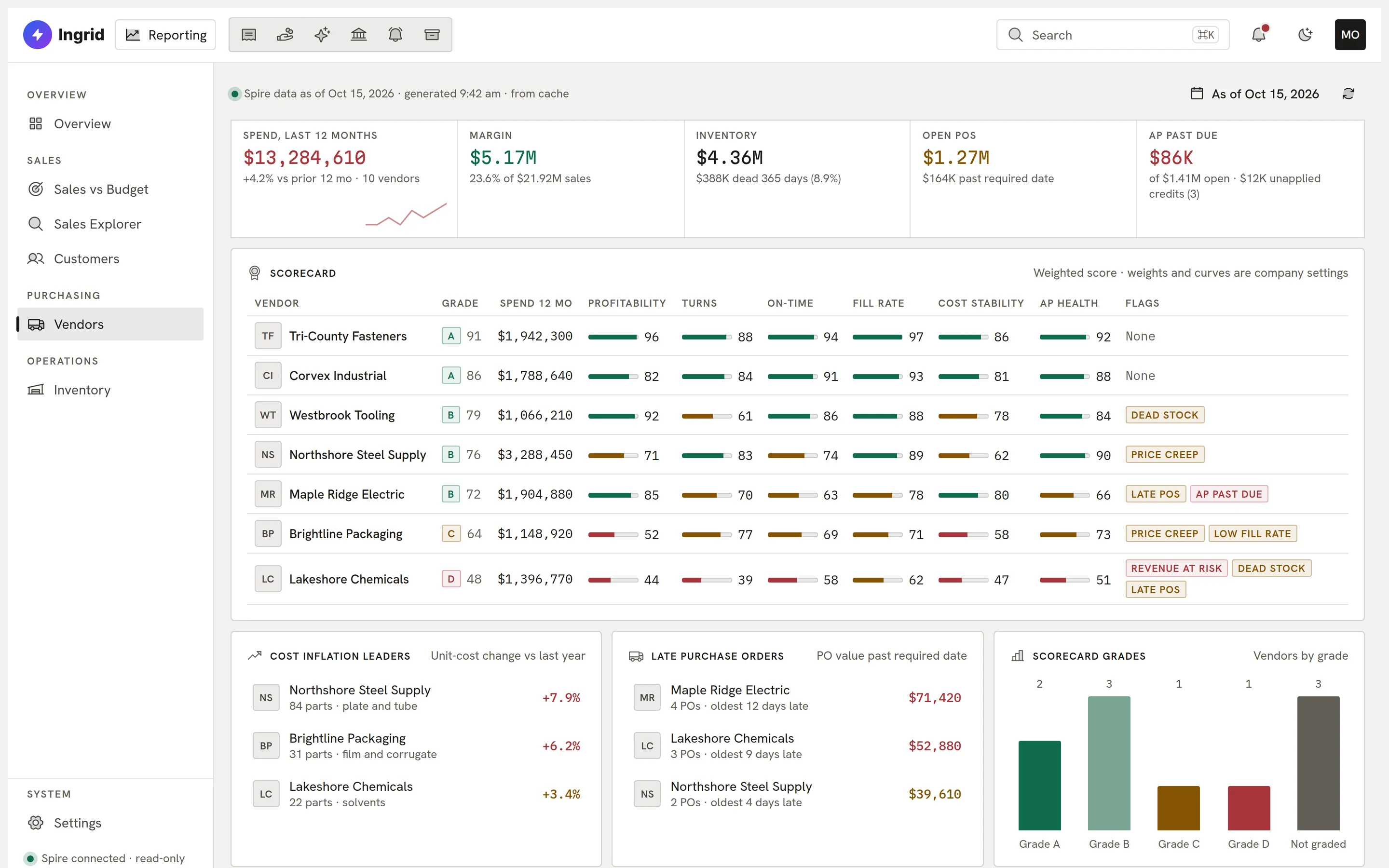
    Vendor scorecard.
  6. 06 Inventory

    What to reorder, and what to stop buying.

    Reorder, stock-out, overstock and dead-stock queues with a 90-day runway.
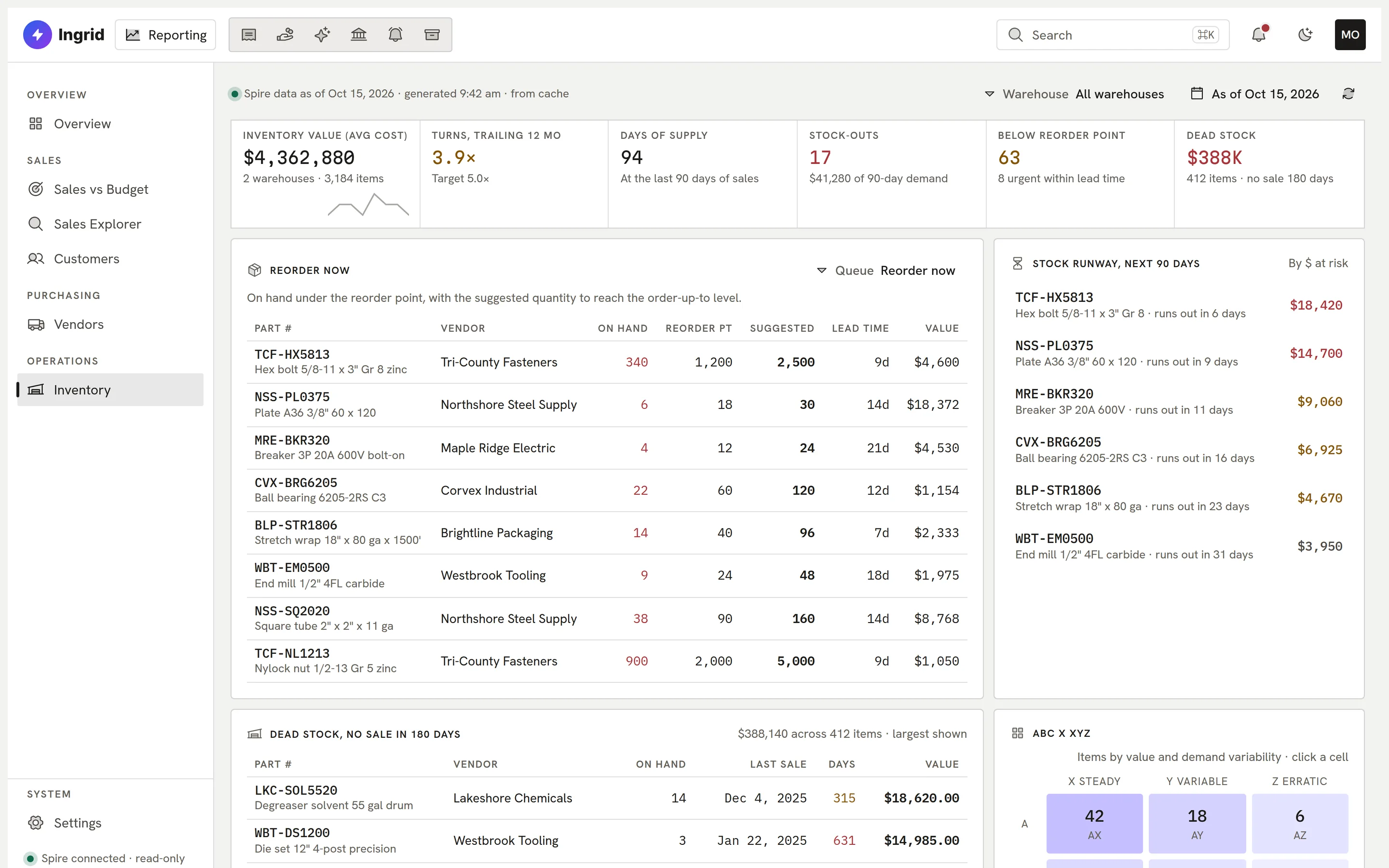
    Inventory queues.
Custom Reporting
Sales Explorer: sales by vendor.
Playground

Explore the dashboards. Click to drill.

The dashboards with a sample distributor’s data, in your browser.

Custom Reporting
Sales by vendor

This is the real Custom Reporting screen running in your browser with sample data. Click anything; nothing is saved and nothing leaves the page.

What it covers

Sales, purchasing, stock and finance.

Dashboards built around a distributor’s week, on data read straight from Spire.

  • Sales vs budget

    Budgets by territory, month-to-date pace and trend.

  • Sales Explorer

    Group, filter and drill to the part, as of any date.

  • Customer portfolio

    Segments, health grades, churn and order-rhythm alerts.

  • Vendor scorecard

    Fill rate, on-time receipts and risk flags.

  • Inventory

    Reorder, stock-out, overstock and dead-stock queues with a 90-day runway.

  • Finance KPIs

    AP days overdue and the figures behind them.

  • Classic reports

    A classic view that reproduces the reports your team already uses, with Excel export.

  • Read-only

    Reads Spire directly. Never writes to it.

Everything Custom Reporting does

The complete list. No asterisks.

All 52 capabilities, each checked against the product as it ships today. Anything still being built is marked.

Showing 52 of 52 features

Sales reporting08

  • Sales vs Budget by territorySales and margin by territory against last year and against budget.
  • Month-to-date snapshotOpen, booked, invoiced and returned (RMA) sales this month by territory, with a margin pace marker based on business days elapsed.
  • Sales ExplorerThree years of sales and margin grouped by vendor, product line, part or customer.
  • Monthly and quarterly trendSales and margin by month and quarter, this year against last year.
  • Sales KPIsLines, orders, lines per order and average order value over a date range.
  • Click-through drill-downsClick a territory, rep, customer or vendor row to open the matching detail report, with a breadcrumb trail back.
  • Run any report as of a dateEvery report takes an 'as of' date so a past day can be re-run and compared.
  • Overview dashboardA landing page with headline tiles, a top-territories bar chart and margin attainment against budget.

Customers10

  • Customer list with detail paneEvery customer in a searchable list, with a detail pane for details, contacts, metrics, products and orders.
  • Customer portfolio dashboardSales concentration, segments, at-risk revenue, health grades, growers and decliners, margin leaders and laggards, AR over terms and new customers this year.
  • RFM segmentsGroups customers by how recently, how often and how much they buy, with cut-offs set in Settings.
  • Account health scoreGrades each customer on a configurable score; click a grade to filter the list.
  • Churn and order-rhythm alertsFlags customers who are overdue against their own ordering rhythm and the revenue at risk.
  • Cross-sell gapsLists product lines that territory peers buy and this customer does not.
  • Customer AR agingShows the customer's receivables by age and amounts over terms.
  • Contact searchSearch customer contacts across the whole customer base.
  • Rule-written customer overviewA plain-English summary of each customer, where every sentence states the figure and threshold that produced it.
  • Customer clusters with CSV exportCounts customers per sales cluster by invoice-to address and exports each cluster's customer list to CSV.

Vendors and purchasing06

  • Vendor list and portfolioEvery vendor with a portfolio dashboard of purchases and sales.
  • Vendor scorecardScores each vendor on profitability, inventory turns, on-time receipts, fill rate, cost stability and AP health.
  • Vendor risk flagsFlags revenue at risk, late purchase orders, price creep and dead stock for each vendor.
  • Vendor detail tabsDetails, contacts, metrics, purchasing, payables and items for each vendor.
  • Fill rate and on-time receiptsMeasures how completely and how promptly each vendor fills purchase orders.
  • Rule-written vendor overviewA plain-English vendor summary in which every finding names the number and threshold behind it.

Inventory08

  • Inventory KPI stripInventory value at average cost, trailing 12-month turns, days of supply, stock-outs, below reorder point, dead stock and overstock.
  • Action queuesLists for reorder now, stock-out risk, overstock, dead stock, vendor cost changes and negative or suspect on-hand.
  • 90-day stock runwayShows which items will run out within 90 days, sorted by dollars at risk or soonest first.
  • ABC x XYZ matrixClassifies items by value and demand variability; click a cell to filter the item list.
  • Stock age and value breakdownDays since last receipt and inventory value by warehouse and category.
  • Item detail drawerPer-item stock, open purchase orders, lead times, vendor pricing and ledger history.
  • Purchase order and transfer previewsIn developmentShows what a reorder, transfer or adjustment would write to Spire, as a preview only.
  • Turns and excess reportInventory turns, weeks on hand and excess against a target, by department and product code.

Finance KPIs03

  • Finance KPIsRuns the company's existing finance KPI report.
  • AP days overdue detailPaid AP invoices from the last 182 days and how late each one was paid.
  • Sales outbound coverage KPIRuns the company's existing outbound coverage KPI from its stored report.

Classic view (exact report parity)04

  • Classic report menuA one-click switch to a copy of the company's existing report menu, reproducing the reports your team already uses.
  • Same columns, same rowsClassic shows every column and row the original report returns, in the same order, so figures can be checked line by line.
  • Find and export to ExcelFilter any Classic grid as you type and export it to an .xlsx file.
  • Classic / New view toggleSwitch between the original report layout and the redesigned dashboards from the sidebar.

Settings and budgets04

  • Company metric settingsThresholds for churn, RFM, health score, cross-sell, returns, vendor scoring and clusters are company settings, not hard-coded.
  • Budget entry by territoryEnter revenue and margin budgets per territory and month; Sales vs Budget and MTD use them.
  • Freight-in-sales switchOne setting decides whether freight lines count as sales, and every sales report follows it.
  • Inventory settingsConfigurable stock-out horizon, dead-stock days and other inventory cut-offs.

Data access and security07

  • Read-only Spire connectionReads Spire through the Ingrid data connector using only a read capability; there is no write path.
  • Fixed, validated reportsEach report runs one fixed read-only statement, and its parameters are validated before use.
  • Report cachingResults are cached (15 minutes for today, a day for past dates) to keep load on the on-premises Spire server low.
  • Data freshness indicatorEach page shows when its data was generated and whether it came from cache.
  • Truncation-safe totalsIf a result is cut off, custom reporting shows no totals or charts rather than wrong ones.
  • Ingrid sign-in and company switchUses the shared Ingrid login, with company switching and password change.
  • Per-rep data scopingComingLimit each sales rep to their own territories and customers.

ERP support02

  • Works with SpireWorks with your Spire company.
  • AccountMate supportComingAccountMate support is coming soon.

Reporting, built around you.

Tell us which reports your team lives in. We will show you what Custom Reporting would look like for your business.

Book a demo